Picture this: you just sold three items on eBay before breakfast, and now you're hunched over your laptop printing shipping labels on regular paper, cutting them out, and taping them to boxes. It works — technically — but it's slow, messy, and screams "hobby seller." A dedicated thermal label printer changes everything. You get clean, scan-ready 4×6 labels in under two seconds, no ink to buy, no scissors required.
In 2026, the market for thermal shipping label printers is crowded with options ranging from $30 budget picks to $200 professional units. We tested and compared seven of the best models specifically for eBay sellers — whether you ship five packages a week or five hundred. If you want a broader look at label-making tools, check out our full label makers category for more options. For background on direct thermal printing technology, Wikipedia's article on thermal printing gives a solid technical overview.
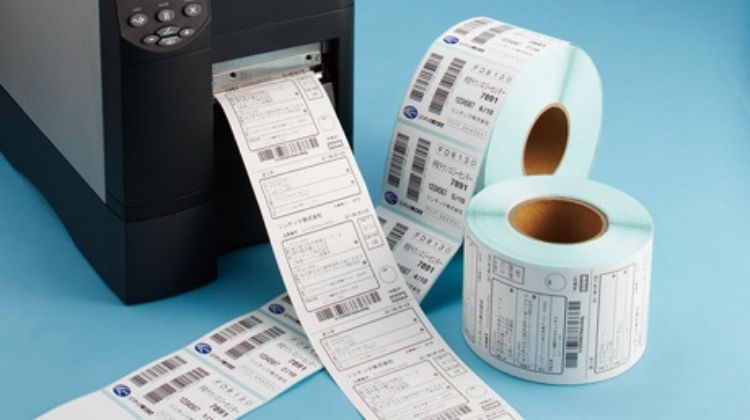
All seven printers on this list use direct thermal technology (heat activates the label coating — no ink cartridges, no toner). They all print standard 4×6-inch shipping labels compatible with eBay, USPS, FedEx, and UPS. The real differences come down to connectivity, speed, label compatibility, and how they fit into your existing workflow. We break it all down below. And if you need help printing return labels, our guide on how to print a return shipping label on eBay walks you through the process step by step.
Contents
- Standout Models in 2026
- Full Product Breakdowns
- Rollo Wireless — Best Overall Wi-Fi Label Printer
- MUNBYN RealWriter 941 — Best Budget USB Printer
- Arkscan 2054A — Best for Multi-Platform Sellers
- JADENS Bluetooth — Best Entry-Level Wireless Option
- DYMO LabelWriter 5XL — Best for Dedicated DYMO Users
- POLONO PL80E — Best High-Speed 2026 Release
- OFFNOVA Bluetooth — Best for iOS and Android Sellers
- What to Look For When Buying
- FAQs
Standout Models in 2026
- #PreviewProductRating
- Bestseller No. 1
 Rating:

- Bestseller No. 2
 Rating:
 - Bestseller No. 3
 Rating:
 - Bestseller No. 4
 Rating:
 - Bestseller No. 5
 Rating:
 - Bestseller No. 6
 Rating:
 - Bestseller No. 7
 Rating:
Full Product Breakdowns
1. Rollo Wireless Shipping Label Printer — Best Overall Wi-Fi Label Printer
The Rollo Wireless is our top pick for eBay sellers in 2026, and it's not particularly close. It prints one 4×6 label per second at 150mm/s — that's fast enough that you'll never feel like the printer is the bottleneck when you're trying to knock out a morning's worth of orders. The 203 DPI print head produces crisp, dark barcodes that scan cleanly every time, which matters when your carrier is running labels through a handheld scanner in a dim warehouse.
What makes the Rollo stand out from every other printer on this list is the connection flexibility. You can hook it up via USB the old-fashioned way, connect it to your home Wi-Fi network for wireless printing from a Windows PC, Mac, Chromebook, or Android device, or use AirPrint to print directly from your iPhone or iPad without installing a single driver. No Bluetooth pairing headaches, no app required for desktop users. Rollo also offers their own Ship Manager app that ties into eBay, Etsy, Shopify, and other platforms — giving you discounted shipping rates without paying for a third-party service like ShipStation.
The printer itself feels solid and professional. It's slightly larger than some competitors, but the build quality justifies the footprint. Setup takes under five minutes on Wi-Fi. For sellers who ship more than 20 packages a week, this is the printer we'd recommend without hesitation.
Pros:
- True Wi-Fi printing — no Bluetooth app required for desktop
- AirPrint support for iPhone and iPad out of the box
- 150mm/s print speed, one 4×6 label per second
- Works with every major shipping platform (eBay, USPS, FedEx, UPS, Shopify, Etsy)
- Free Ship Manager app with discounted rates
- Compatible with Windows, Mac, Chromebook, Android, Linux
Cons:
- Higher upfront cost compared to budget options
- Wi-Fi setup can be tricky on some routers with 5GHz-only networks
2. MUNBYN RealWriter 941 — Best Budget USB Printer
The MUNBYN RealWriter 941 is the printer we'd recommend to someone just starting out on eBay who doesn't want to spend a lot up front. It sets up in under a minute on Windows or macOS — it installs like a regular printer, meaning your operating system handles the driver automatically. No custom software, no complicated configuration. Plug it in, print a test label, start shipping.
One genuinely useful feature is the Auto Analyze label learning system. The printer reads your label stock and adjusts settings automatically, so you don't have to fiddle with paper size settings every time you switch between different label rolls. It works with warehouse labels, food nutrition labels, and most direct thermal label formats in addition to standard shipping labels. Platform compatibility is comprehensive — eBay, Etsy, Shopify, Amazon, Poshmark, ShipStation, Shippo, and more are all supported.
The RealWriter 941 comes in both USB-only and USB+Bluetooth variants. If you want to print from your phone occasionally, the Bluetooth model is worth the small price bump. Print quality is solid at 203 DPI — barcodes scan reliably, and text is readable. It's not the fastest printer on this list, but for casual-to-moderate volume sellers, you won't feel the difference in daily use.
Pros:
- One-minute setup on Windows and macOS — installs as a regular printer
- Auto label recognition adjusts to different label sizes automatically
- Compatible with all major selling and shipping platforms
- Available in USB-only or USB+Bluetooth configurations
- Strong value for the price
Cons:
- No Wi-Fi — Bluetooth model still requires USB for Mac
- Print speed slower than premium options
- Bluetooth reliability can vary by device
3. Arkscan 2054A — Best for Multi-Platform Sellers
If you sell across multiple platforms — eBay, Etsy, Amazon, Poshmark, Shopify, and more all at once — the Arkscan 2054A was practically designed for you. Its compatibility list is the longest on this page, covering Amazon FBA/FBM, EasyPost, EasyShip, Endicia Dazzle, FedEx Ship Manager, Inventory Lab, Pirateship, StockX, and over 25 other shipping services. You won't run into a workflow it can't handle.
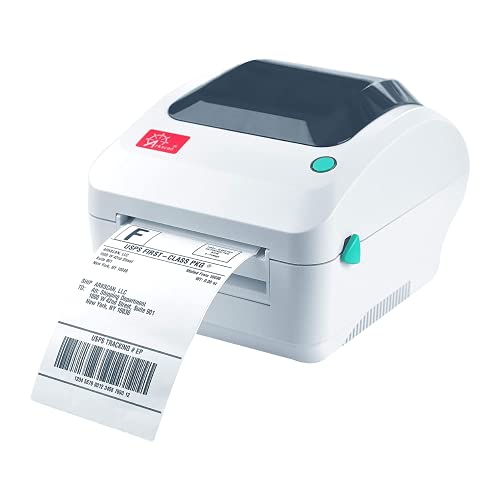
The 2054A prints at 5 inches per second and handles both roll paper (loaded inside the printer) and fanfold paper (loaded from the back), which is a useful dual-loading option if you buy labels in bulk. It supports label widths from 0.75 inches up to 4.25 inches and lengths up to 90 inches, making it genuinely multi-purpose for product labels, barcode labels, and warehouse tags — not just shipping labels. Works across Windows, Mac, Chromebook, and Android.
Arkscan includes a free copy of BarTender UltraLite (Windows only) for designing custom product and warehouse labels. It's a basic but functional design tool that most sellers will find handy for creating FNSKU labels for Amazon FBA, custom product tags, or barcode labels. Build quality is no-frills but functional. For high-volume multi-channel sellers, this is a workhorse that earns its place.
Pros:
- Most extensive platform compatibility list of any printer reviewed here
- Supports both roll and fanfold label loading
- Wide label size range (0.75"–4.25" wide, up to 90" long)
- Includes free BarTender UltraLite label design software
- Works on Windows, Mac, Chromebook, and Android
Cons:
- No wireless connectivity — USB only
- BarTender software is Windows-only
- Design feels dated compared to newer models
4. JADENS Bluetooth Thermal Shipping Label Printer — Best Entry-Level Wireless Option
The JADENS Bluetooth printer is the right pick if you want wireless printing at a lower price point and you're okay with using an app on your phone. It uses a Japanese thermal print head rated at 203 DPI — print quality is clean and consistent, and barcodes scan reliably. It handles both fanfold and roll labels, and supports label widths from 1.57 inches up to 4.1 inches.
Here's what you need to know about connectivity before you buy: Bluetooth works natively on Windows 8 or later and Mac — you can pair it like any Bluetooth device and print from your shipping platform of choice. On Android and iOS, you need to download the JADENS Printer app to print via Bluetooth, which adds a step but works fine once configured. USB connection works on Windows 7 and newer and macOS 10.9 and newer without any special setup. One important note: when you switch label sizes, press and hold the feed button to recalibrate — the printer won't do it automatically.
The blue color is a minor cosmetic thing but it looks sharp on a desk. JADENS supports Amazon, Shopify, Etsy, USPS, and other major platforms. For new eBay sellers who want Bluetooth flexibility without spending top dollar, this is a reliable starting point. If you're comparing this against other small-business printers, our guide to the best color label printers for small business covers broader use cases worth reading.
Pros:
- Bluetooth works natively on Windows and Mac without an app
- Japanese thermal print head delivers consistent 203 DPI quality
- Supports both fanfold and roll labels
- Solid build at a competitive price
- Works with major platforms including Amazon, Shopify, Etsy, USPS
Cons:
- Requires JADENS app for Bluetooth printing on Android and iOS
- Manual recalibration required when switching label sizes
- No Wi-Fi — Bluetooth range is limited
5. DYMO LabelWriter 5XL — Best for Dedicated DYMO Label Users
DYMO is one of the most recognizable names in the label printer space, and the LabelWriter 5XL is their flagship unit for shipping labels. The headline feature is Automatic Label Recognition — a patented system that identifies the size, type, and remaining quantity of any DYMO label roll you load. No manual calibration, no guessing at settings. Load a roll, and the printer handles the rest.
That automatic recognition also eliminates the label waste you'd normally get from misalignment or test prints. DYMO claims 65% less label waste compared to printers without this feature. The printer handles UPS, FedEx, and USPS extra-wide shipping labels and integrates cleanly with eBay, Amazon, Etsy, and Poshmark. If you're already in the DYMO ecosystem — meaning you use DYMO labels and DYMO software elsewhere in your business — this printer slots in seamlessly.
There's a significant trade-off you need to understand before buying: the LabelWriter 5XL is calibrated to work exclusively with DYMO-branded labels. You cannot use third-party label rolls. DYMO labels cost more per roll than generic alternatives. If you're buying in bulk and want to save money on consumables, this printer will frustrate you. But if you prioritize reliability, jam-free printing, and automatic everything, the DYMO 5XL delivers. It's aimed squarely at sellers who want a polished, professional-grade experience and don't mind paying for it.
Pros:
- Automatic Label Recognition — no manual calibration needed
- 65% less label waste thanks to automatic alignment
- Jam-free printing with DYMO-branded labels
- Displays label size, type, and remaining quantity automatically
- Trusted brand with strong software ecosystem and support
Cons:
- Works ONLY with DYMO-branded labels — no third-party label rolls
- DYMO labels cost significantly more than generic alternatives
- Higher long-term operating cost compared to open-format printers
6. POLONO PL80E Bluetooth Thermal Label Printer — Best High-Speed 2026 Release
The POLONO PL80E is a 2025 release that hits shelves with one standout specification: 72 labels per minute for 4×6-inch labels. That's faster than anything else on this list for sustained throughput. If you're running a high-volume eBay operation and need to burn through a stack of orders in the morning, this speed is genuinely meaningful. Print quality sits at 203 DPI, which is standard for this category and produces clean, scannable barcodes.
Label flexibility is good — it handles fanfold and roll labels ranging from 0.97 inches to 4.25 inches wide. Bluetooth printing works through the Labelnize app (available on Google Play and the App Store for Android and iOS 13 or above). For Windows 7 and above, you install the driver via USB first, then switch to Bluetooth — a reasonable one-time setup. USB printing works on both Windows and Mac without issues. There are some things to note: Mac users don't get Bluetooth support, Chrome OS isn't supported at all, and if your labels aren't printing, the most common fix is making sure the paper is face-up and your print dimensions are set to 100×150mm.
The PL80E is a strong value for what you get in 2026. Speed, solid build, good label compatibility, and competitive pricing make it a legitimate contender for the top spot. The only reason it lands behind the Rollo is the app-dependent Bluetooth setup, which adds friction compared to Rollo's native Wi-Fi printing.
Pros:
- 72 labels per minute — fastest sustained throughput on this list
- Supports fanfold and roll labels (0.97"–4.25" wide)
- Bluetooth via Labelnize app on Android and iOS
- USB works natively on Windows and Mac
- 2025 updated design with improved print head performance
Cons:
- No Bluetooth support for Mac — USB only on macOS
- Chrome OS not supported
- Bluetooth requires app — no native OS pairing
- Must install USB driver before enabling Bluetooth on Windows
7. OFFNOVA Bluetooth Thermal Label Printer — Best for iOS and Android Sellers
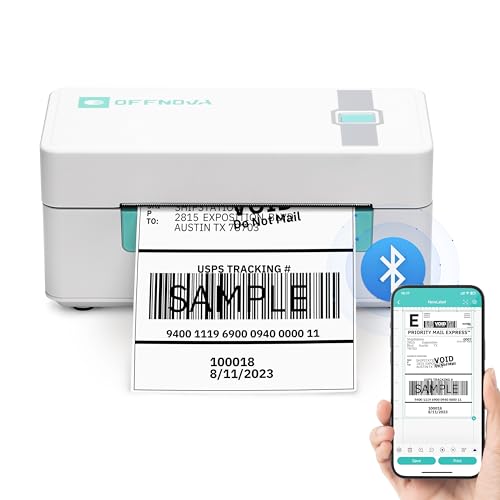
The OFFNOVA is built for sellers who do most of their work from a phone or tablet. Bluetooth printing runs through the 4Barcode app (available on Google Play and the App Store), which supports template creation for QR codes, Excel data imports, and web file printing — making it more versatile for label customization than most competitors in this price range. Bluetooth works on Android and iOS; for Windows, Mac, Linux, and Chromebook, you connect via USB and use the driver downloaded from OFFNOVA's website.
Auto Calibration is a standout convenience feature. Switch label sizes, feed in the new roll, and the printer reads the paper and adjusts automatically — no manual settings changes needed. For sellers who use different label sizes for different product types, this removes a common source of frustration. OFFNOVA supports USPS, eBay, Shopify, Etsy, and other major platforms. The default Bluetooth PIN for Android pairing is 0000 — worth noting before your first setup.
Build quality is comparable to JADENS and POLONO — functional and clean without feeling premium. Where the OFFNOVA earns its spot is the combination of auto-calibration, a capable companion app, and broad OS compatibility via USB. For mobile-first sellers who want flexibility without paying for Rollo-level features, this is an excellent choice. Also worth checking: our best receipt printers for Square guide if you run a physical storefront alongside your eBay operation.
Pros:
- 4Barcode app supports QR codes, Excel imports, and template creation
- Auto Calibration switches label sizes automatically
- USB works on Windows, Mac, Linux, and Chromebook
- Competitive pricing for the feature set
- Responsive customer support according to user reviews
Cons:
- Bluetooth limited to Android and iOS — no native Bluetooth on Mac or Windows
- Requires driver download from manufacturer website for USB setup
- Less brand recognition and long-term support track record than MUNBYN or DYMO
What to Look For When Buying a Thermal Printer for eBay Shipping Labels
Connectivity: Wi-Fi vs. Bluetooth vs. USB
This is the decision that affects your daily workflow more than any spec on the box. Here's how to think about it:
- Wi-Fi (Rollo Wireless): The best experience for desktop users. The printer sits on your network like any other device — no cables, no pairing, works from any computer on your Wi-Fi. Strongly recommended if you print from a desktop or multiple devices.
- Bluetooth (JADENS, POLONO, OFFNOVA, MUNBYN Bluetooth): Good for phone-based workflows. Most Bluetooth printers require an app on Android/iOS and native OS pairing on Windows/Mac. Short range, occasional pairing issues, but cable-free.
- USB (Arkscan, MUNBYN USB, all models as fallback): Most reliable connection. Zero pairing complexity. If your packing station is near your computer, USB is perfectly fine and saves money.
If you're printing from a dedicated desktop at a packing station, USB is underrated. If you need to move around your space or print from a phone, Bluetooth works. If you want the printer anywhere in your space without cables or apps, Wi-Fi is worth the extra cost.
Print Speed and Volume
For low-volume sellers (under 20 shipments a day), virtually every printer on this list is fast enough — even the slowest prints a label in two to three seconds. Speed starts to matter at 50+ labels per day. Here's the quick breakdown:
- POLONO PL80E: 72 labels/minute — fastest on this list
- Rollo Wireless: 150mm/s, one label per second — excellent sustained speed
- Arkscan 2054A: 5 inches/second — solid mid-range
- MUNBYN, JADENS, OFFNOVA: Standard speed, fine for moderate volume
- DYMO 5XL: Not rated by speed — designed for reliability over raw throughput
Label Compatibility and Consumable Costs
Six of the seven printers on this list work with generic third-party label rolls — this is a meaningful cost advantage. You can buy 500-count rolls of 4×6 labels for a fraction of what brand-specific labels cost. The one exception is the DYMO LabelWriter 5XL, which only works with DYMO-branded labels. Budget for that when comparing prices. Over the course of a year, label costs often exceed the printer cost for high-volume sellers — so open-format compatibility matters.
Also consider fanfold vs. roll labels. Fanfold labels stack accordion-style in a box and feed from the back of compatible printers (Arkscan, JADENS, POLONO support both). Roll labels are more common and universally supported. If you buy in bulk, fanfold tends to be cheaper per label.
Platform and OS Compatibility
All seven printers support eBay, USPS, FedEx, and UPS. The differences are in the details:
- If you sell on Amazon FBA and need FNSKU labels: Arkscan 2054A is the best choice with its free BarTender design software.
- If you use ShipStation or ShippingEasy: Rollo's Ship Manager app bundles this functionality for free.
- If you use a Mac: avoid POLONO for Bluetooth (USB only on macOS), and note that DYMO 5XL doesn't have native Mac Bluetooth either.
- If you use Chrome OS: Arkscan, OFFNOVA (USB), Rollo, and MUNBYN support Chromebook. POLONO does not.
- If you print from Linux: Rollo and Arkscan explicitly support Linux. Others may work but aren't officially supported.
FAQs
Do thermal label printers require ink or toner?
No. Direct thermal printers use heat to activate a chemical coating on the label surface — no ink, no toner, no ribbons. The print head applies heat in precise patterns, and that's what creates the image. The only consumable you ever buy is label rolls. This is one of the primary reasons thermal printers are popular with shipping-heavy sellers — zero ongoing ink costs.
What label size do I need for eBay shipping labels?
eBay generates standard 4×6-inch (100×150mm) shipping labels for all major carriers — USPS, FedEx, and UPS. All seven printers reviewed here are designed specifically for this size. Most also support smaller label sizes for product tags, barcodes, and custom labels. When printing from eBay, select "4×6" as your label format in the print dialog to ensure correct sizing.
Can I use any label brand with these printers?
For six of the seven printers on this list, yes — generic third-party label rolls work fine. This is a significant cost advantage since generic 4×6 labels cost considerably less per roll than brand-specific options. The exception is the DYMO LabelWriter 5XL, which is engineered to work exclusively with DYMO-branded labels. If you want to use budget label rolls, avoid the DYMO 5XL.
Is Wi-Fi better than Bluetooth for a shipping label printer?
For most eBay sellers printing from a desktop or laptop, yes — Wi-Fi is more convenient. The printer connects to your network once and is discoverable by any device on that network without pairing steps. Bluetooth has a shorter range (typically 30 feet), requires pairing each device, and often needs a companion app on mobile. That said, Bluetooth is fine for dedicated single-device setups and costs less. If your packing station has a dedicated computer, USB is actually the most reliable option and eliminates wireless variables entirely.
How do I print a shipping label on eBay with a thermal printer?
Once your printer is installed, go to your eBay Seller Hub, find the sold order, click "Print shipping label," and select your carrier and service. When the print dialog appears, set the paper size to 4×6 inches (or 100×150mm), select your thermal printer from the printer list, and print. The label comes out ready to peel and stick — no cutting, no tape required. For more detail, see our step-by-step guide on how to print a return shipping label on eBay.
How long do thermal labels last before fading?
Standard direct thermal labels fade over time when exposed to heat, UV light, or friction — typically within one to two years under normal conditions. For shipping labels that spend a few days in transit, this is never an issue. Where fading matters is for product labels or long-term storage tags — in those cases, look for "top-coated" thermal labels designed for extended durability, or switch to thermal transfer printing (which uses a ribbon for permanent ink). All the printers on this list are direct thermal and appropriate for shipping labels and short-to-medium-term product labeling.
Buy on Walmart
- Rollo Wireless Shipping Label Printer - Wi-Fi Thermal Label — Walmart Link
- MUNBYN Shipping Label Printer RealWriter 941, 4x6 Thermal La — Walmart Link
- Arkscan 2054A Shipping Label Printer for Windows Mac Chromeb — Walmart Link
- JADENS Bluetooth Thermal Shipping Label Printer – Wireless 4 — Walmart Link
- DYMO LabelWriter 5XL Label Printer, Automatic Label Recognit — Walmart Link
- POLONO Bluetooth Thermal Shipping Label Printer, Wireless 4x — Walmart Link
- OFFNOVA Shipping Label Printer, Bluetooth Thermal Label Prin — Walmart Link
Buy on eBay
- Rollo Wireless Shipping Label Printer - Wi-Fi Thermal Label — eBay Link
- MUNBYN Shipping Label Printer RealWriter 941, 4x6 Thermal La — eBay Link
- Arkscan 2054A Shipping Label Printer for Windows Mac Chromeb — eBay Link
- JADENS Bluetooth Thermal Shipping Label Printer – Wireless 4 — eBay Link
- DYMO LabelWriter 5XL Label Printer, Automatic Label Recognit — eBay Link
- POLONO Bluetooth Thermal Shipping Label Printer, Wireless 4x — eBay Link
- OFFNOVA Shipping Label Printer, Bluetooth Thermal Label Prin — eBay Link
The right thermal printer pays for itself in the first month — buy the one that fits your actual workflow, not the one with the longest spec sheet.



About Chris & Marry
Chris and Mary are a couple with a shared background in graphic design and print production who have spent years working with printers across creative and professional contexts — from art printing and photo output to label production and professional document work. Their combined experience evaluating printer performance, color accuracy, and paper handling across inkjet and laser platforms gives them a practical, hands-on perspective on what makes a printer worth buying. At ShopChrisAndMary, they cover printer reviews, buying guides, and recommendations for artists, photographers, and professional users.
Time to get FREE Gifts. Or latest Free printers here.
Disable Ad block to reveal all the info. Once done, hit a button below