You've spent hours drawing your comic pages, and now you want prints that actually do your artwork justice. The wrong printer turns crisp line art into muddy blobs and kills vibrant colors with banding or streaks. In 2026, there are more good options than ever — but picking the right one depends on your page size, budget, and how often you print.
Comic book printing demands a lot from any machine. You need sharp black lines, saturated colors, and consistent results across every page. Whether you're self-publishing a limited run, printing convention copies, or just archiving your originals, the printer you choose makes or breaks the final product. We've tested and researched every model below to help you find the best fit for your workflow. If you're looking for other art and craft printer options, we cover those too.
From affordable wide-format inkjets to professional photo printers used by galleries, this guide breaks down seven top performers. We explain who each one is for, what it does well, and where it falls short. Read on to find your perfect match.
Contents
- Standout Models in 2026
- In-Depth Reviews
- Canon PIXMA PRO-200S — Best Overall for Comic Art
- Canon imagePROGRAF PRO-300 — Best for Fine Art Comics
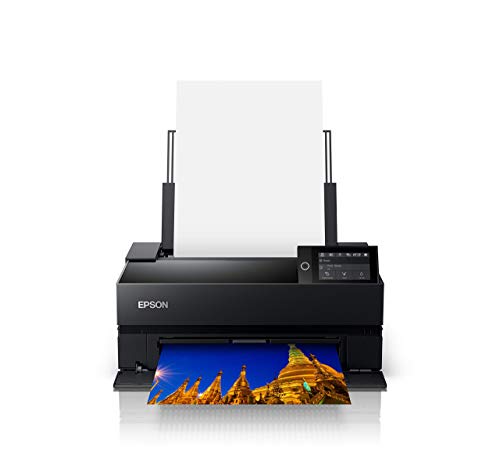
- Epson SureColor P700 — Best 13" Pro Inkjet
- Epson Expression Photo HD XP-15000 — Best Budget Wide-Format
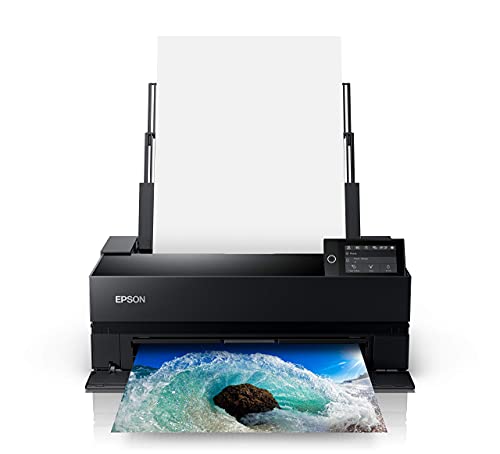
- Epson SureColor P900 — Best for Large Format Pages
- Canon imagePROGRAF PRO-1100 — Best Professional 17" Printer
- Epson WorkForce Pro WF-7840 — Best All-in-One for Comic Creators
- Buying Guide
- Questions Answered
- Final Thoughts
Standout Models in 2026
- #PreviewProductRating
- Bestseller No. 1
 Rating:

- Bestseller No. 2
 Rating:
 - Bestseller No. 3
 Rating:
 - Bestseller No. 4
 Rating:
 - Bestseller No. 5
 Rating:
 - Bestseller No. 6
 Rating:
 - Bestseller No. 7
 Rating:
In-Depth Reviews
1. Canon PIXMA PRO-200S — Best Overall for Comic Art
The Canon PIXMA PRO-200S is the printer we'd recommend to most comic creators without hesitation. It runs an 8-color dye-based ink system that produces some of the most vivid, punchy colors you'll see from a home printer in this price range. Dye-based ink (ink that dissolves into the paper rather than sitting on top) gives you that glossy, saturated look that makes comic art pop — especially on coated photo paper. Skin tones look natural, primary colors are bold, and black outlines stay crisp.
Speed matters when you're printing a full issue. This machine prints a bordered A3+ page in just 90 seconds and knocks out an 8" x 10" in 53 seconds. That's fast enough that printing 24 pages doesn't feel like a chore. The 3.0" color LCD screen makes setup and adjustment easy without needing to dig into menus on your computer. Borderless printing goes all the way up to 13" x 19", which gives you full bleed on standard comic-size pages with room to trim.
Wireless connectivity works reliably over Wi-Fi, and the Canon Print Studio Pro software gives you solid color management controls if you want to dial in a specific paper profile. The PRO-200S is not a pigment-based printer, so it won't match the fade resistance of professional archival options — but for convention prints, self-published runs, or high-quality proofing copies, it delivers outstanding results. If you're printing on glossy stock and want colors that leap off the page, this is your machine.
Pros:
- Exceptionally vivid, saturated color output ideal for comic art
- Fast print speeds — A3+ in 90 seconds
- Borderless printing up to 13" x 19"
- Easy-to-use 3.0" color LCD screen
- Reliable wireless connectivity
Cons:
- Dye-based ink is less fade-resistant than pigment — not ideal for archival prints
- Ink costs add up quickly with heavy use
2. Canon imagePROGRAF PRO-300 — Best for Fine Art Comics
The Canon imagePROGRAF PRO-300 steps things up with a professional-grade pigment ink system designed for photographers and fine artists. Pigment ink (microscopic solid particles suspended in liquid) sits on top of the paper and resists fading for decades when stored properly — a key advantage if you're printing collector editions or archival copies of your work. The PRO-300 prints up to 13" x 19" with a wider color gamut than most consumer inkjets, giving your artwork depth and tonal range that budget printers simply can't match.
Canon's Nozzle Recovery System automatically detects clogged nozzles and corrects them without wasting paper or your time. Skew Correction keeps pages feeding straight even on thicker art paper or cardstock, which matters when you're printing on specialty media. The 3.0" LCD display and included Professional Print & Layout software give you precise control over color rendering, paper profiles, and layout positioning — useful when you're trying to match your digital art colors as closely as possible.
The PRO-300 has a compact footprint for a professional printer, so it won't dominate your workspace. Mobile printing is fully supported, and the setup process is straightforward. This is the printer for creators who want gallery-quality output with pigment-based permanence. If you're also working with fine art paper or watercolor stock, the PRO-300 handles it cleanly. You can compare it against other wide-format options in our best 13x19 printer guide.
Pros:
- Professional pigment ink for long-lasting, fade-resistant prints
- Nozzle Recovery System reduces maintenance headaches
- Handles specialty and fine art papers reliably
- Compact build for a pro-level machine
- Excellent color accuracy with included layout software
Cons:
- Higher cost per print than consumer inkjets
- Color vibrancy slightly less punchy than dye-based systems on glossy paper
3. Epson SureColor P700 — Best 13" Pro Inkjet
The Epson SureColor P700 is a 13-inch professional inkjet that brings something most printers in this class can't offer: dedicated nozzles for both Photo Black and Matte Black ink. On most inkjets, you have to wait for the printer to switch between these two ink types depending on your paper choice — a slow, wasteful process. The P700 eliminates that entirely. Switch from glossy paper to matte paper and you're ready to print immediately. For comic creators who use both paper types in the same session, this is a genuine workflow improvement.
The all-new UltraChrome PRO10 ink set includes a Violet ink channel that pushes the color gamut (the range of colors a printer can reproduce) significantly wider than standard 8-color systems. Blues and purples — colors that often look washed out or inaccurate on cheaper printers — come through with full saturation and accuracy. The 10-channel MicroPiezo AMC printhead delivers consistent results across the page with no banding or density shifts. That consistency is what separates a pro machine from a consumer model.
Epson's SpectroProofer compatibility makes the P700 a favorite among print professionals who need certified color accuracy. For comic creators, the practical benefit is that what you see on screen matches what you get on paper much more reliably. The P700 handles roll paper, which lets you print long panoramic pages or continuous strips without manually feeding sheets. Build quality is excellent, and the software ecosystem is mature and well-supported. If you want the best 13" inkjet for serious comic work in 2026, the P700 is a top-tier choice.
Pros:
- No Photo/Matte Black switching — dedicated nozzles save time
- UltraChrome PRO10 with Violet for exceptional color range
- Supports roll paper for long continuous prints
- Consistent, banding-free output
- SpectroProofer compatible for certified color accuracy
Cons:
- Higher price point than Canon alternatives at 13"
- Large ink set means more cartridges to track and replace
4. Epson Expression Photo HD XP-15000 — Best Budget Wide-Format
If your budget doesn't stretch to a professional-grade printer but you still need wide-format output for your comics, the Epson XP-15000 is the smartest buy in 2026. It prints borderless pages up to 13" x 19" — enough for full-bleed comic pages with room to trim — using a 6-color Claria Photo HD ink system that includes Red and Gray cartridges. Those extra inks widen the color gamut and improve grayscale output, which matters a lot for black-and-white or greyscale comic work.
The XP-15000 uses Claria Photo HD ink, which is a dye-based system optimized for photo quality on glossy and semi-gloss papers. Line art prints sharp, flat color areas print without streaking, and photo-style illustrations look genuinely impressive for a printer in this price bracket. Amazon Dash Replenishment support means the printer can automatically order replacement ink before you run out — a handy feature if you print frequently and forget to check supplies.
The trade-off is build quality and paper handling. This is a consumer-grade machine, not a professional workhorse. The paper path is more limited than pro models, and it doesn't support roll paper or thick specialty media. Print speeds are slower, and the ink yield per cartridge is lower than pro alternatives. But if you're printing occasional convention stock, personal copies, or art prints on standard glossy paper, the XP-15000 delivers results that look far more expensive than it costs. It's also a sensible companion to our picks in the best photo printer under $200 guide if you're on a tight budget.
Pros:
- Affordable price for 13" x 19" wide-format output
- 6-color ink with Red and Gray for wider gamut and better grayscale
- Borderless printing up to 13" x 19"
- Wireless and Amazon Dash Replenishment ready
Cons:
- Consumer-grade build — not designed for heavy daily use
- Slower print speeds than pro models
- No roll paper support
- Individual cartridge cost adds up over time
5. Epson SureColor P900 — Best for Large Format Pages
The Epson SureColor P900 is the 17-inch version of the P700, and everything we said about that machine applies here — with the added benefit of a wider print area. At 17 inches wide, you can print full-spread comic pages (two facing pages side by side), oversized art prints, or large format convention banners without compromising quality. If you're working at tabloid size or larger, the P900 is the professional standard for this kind of output.
Like the P700, the P900 uses the UltraChrome PRO10 ink system with Violet, dedicated Photo and Matte Black nozzles, and the MicroPiezo AMC printhead. You get all the same quality advantages — wide color gamut, no switching delays, consistent output — in a larger format. Roll paper support is included, so you can run continuous prints for panoramic spreads or create your own print-on-demand sheets. The P900 is also SpectroProofer compatible for professional color certification.
The P900 is a significant investment, and the running costs are higher than 13" models simply because you're covering more surface area per print. The footprint is larger too — make sure you have the desk space before ordering. But if you're producing comic books at scale, selling large art prints, or working with double-page spreads, this is the machine that handles it all without compromise. Inkjet printing technology has advanced dramatically over the last decade, and the P900 represents the best of what's currently available for wide-format art reproduction. For serious creators who've already outgrown 13" printers, there's no better choice in 2026.
Pros:
- 17" wide format — perfect for double-page spreads and large art prints
- UltraChrome PRO10 with Violet for exceptional color range
- No Photo/Matte Black switching
- Roll paper support for continuous printing
- SpectroProofer compatible
Cons:
- High purchase price and running costs
- Large physical footprint requires dedicated workspace
6. Canon imagePROGRAF PRO-1100 — Best Professional 17" Printer
Canon's imagePROGRAF PRO-1100 is a 17-inch professional inkjet that competes directly with the Epson P900, and it brings some genuine advantages to the table. The 11-pigment ink system plus Chroma Optimizer is the standout feature. Chroma Optimizer is a clear overcoat ink that flattens the print surface, improves glossiness uniformity, and prevents bronzing (a color distortion effect where dark areas take on a reddish or greenish sheen in certain lighting). If you're printing on glossy paper, the Chroma Optimizer makes a visible difference in final output quality.
The LUCIA PRO II ink system is Canon's flagship formulation for fine art and professional photography. It delivers improvements in color reproduction in the darker tonal ranges — shadow detail, deep navy blues, rich blacks — areas that are critical in comic art where dark atmosphere and contrast define the visual storytelling. The PRO-1100 faithfully reproduces those dark areas without muddiness or detail loss. For creators who work in high-contrast styles, noir aesthetics, or detailed linework with deep shadows, this matters enormously.
The included Professional Print & Layout software works as a standalone application or as a plug-in from Adobe software, which is the workflow most digital comic artists use. The wireless setup is clean and the printer handles a wide range of media types, including fine art papers, canvas, and specialty stocks. If you're comparing the PRO-1100 against the Epson P900, both are excellent — the Canon edges ahead on gloss handling and Adobe integration, while the Epson has a slight advantage in color gamut width on certain papers. For comic artists who print on glossy or semi-gloss stock, the PRO-1100 is a compelling choice.
Pros:
- Chroma Optimizer eliminates bronzing on glossy paper
- 11-color LUCIA PRO II ink for superior dark tonal reproduction
- Excellent Adobe software integration
- Wide media support including canvas and fine art papers
- 17" wide format for large spreads and art prints
Cons:
- Premium pricing at the top end of the market
- 11 ink cartridges to manage and replace
7. Epson WorkForce Pro WF-7840 — Best All-in-One for Comic Creators
Not every comic creator needs a pure photo-quality printer. If you're running a studio, managing client work, or need to print, scan, copy, and fax from one machine, the Epson WorkForce Pro WF-7840 is the most practical choice on this list. It's an all-in-one that handles wide-format output up to 13" x 19" with PrecisionCore Heat-Free technology — a piezoelectric printing system (uses mechanical movement rather than heat to fire ink droplets) that produces consistent results without the warm-up time of laser printers or the inconsistency of heat-based inkjets.
DURABrite Ultra ink is designed to dry fast and resist smudging, which is useful when you're handling fresh prints or filing pages quickly. The 500-sheet paper capacity is the highest on this list — a big deal if you're doing production runs. The 50-page Automatic Document Feeder (ADF) lets you scan full issues or multipage documents without babysitting the scanner. Auto 2-sided printing is built in, which saves paper when printing double-sided reference sheets, scripts, or storyboards alongside your final art pages.
The WF-7840 won't match the pure color quality of the photo-focused machines above. DURABrite Ultra is an office-grade ink, and while it looks good for general use, it's not delivering gallery-quality art prints. But for daily production work — printing drafts, reference sheets, client copies, lettering proofs, and occasional final pages — it's an efficient and reliable workhorse. The 4.3" touchscreen makes navigation easy, and Epson Connect gives you mobile printing from anywhere. If you also need a scanner for archiving original artwork, check our best book scanner reviews for dedicated scanning options that pair well with this printer.
Pros:
- Print, copy, scan, and fax in one machine
- 500-sheet paper capacity for production runs
- Auto 2-sided printing built in
- Wide-format up to 13" x 19"
- Fast print speeds with DURABrite Ultra ink
- 50-page ADF for scanning full issues
Cons:
- Ink quality not suited for fine art or gallery prints
- Slower than dedicated photo printers for high-quality output
Buying Guide: How to Choose the Best Printer for Comic Books
Dye-Based vs. Pigment Ink — Which Is Right for You?
This is the most important decision you'll make. Dye-based ink dissolves into the paper and produces vivid, saturated colors with a glossy finish. It's the better choice for punchy, vibrant comic art printed on coated or glossy paper. The downside is longevity — dye prints fade faster when exposed to light and humidity. Pigment ink sits on top of the paper surface and resists fading for decades when stored properly. It's the standard for archival prints, fine art, and collector editions. If you're printing convention stock or personal copies for display, pigment ink is worth the premium. If you're printing proofs, drafts, or short runs, dye-based delivers great results at a lower cost per print.
Print Size — Standard vs. Wide Format
Standard US comic book pages are 6.625" x 10.25" (finished trim size), but you want to print at bleed size — usually around 7" x 11" or larger — so you have room to trim. Every printer on this list handles that size easily. Where things get interesting is if you want to print at tabloid size (11" x 17") for manga-sized art, or at 13" x 19" for large display prints and double-page spreads. If you're only printing individual pages, a 13" printer is more than enough. If you want to print full double-page spreads side by side, you need a 17" wide-format machine like the Epson P900 or Canon PRO-1100. Think about your largest print job before you buy. For perspective on other specialty printing projects, our guide to the best printer for 110lb cardstock covers paper thickness considerations that apply here too.
Color Accuracy and Gamut
Color gamut (the range of colors a printer can reproduce) matters more for comic art than for office documents. Wide gamut means you can print vivid greens, deep blues, rich purples, and saturated reds without them looking flat or muddy. Printers with extra ink channels — like the Violet ink in Epson's UltraChrome PRO10 or the 11-ink LUCIA PRO II system in the Canon PRO-1100 — cover a wider gamut than standard 4-color machines. If your comic style relies on bold, saturated colors or high-contrast tonework, invest in a printer with a wider ink set. For greyscale or black-and-white comics, make sure your printer has dedicated gray or matte black inks for smooth tonal gradations without color casts.
Running Costs and Paper Compatibility
The purchase price is only part of the equation. Ink costs vary significantly between models. Professional printers often use larger-capacity cartridges that bring the per-print cost down compared to consumer models, even if the upfront cartridge price is higher. Paper compatibility is equally important — some printers are finicky about third-party media, while others handle a wide range of glossy, matte, fine art, and specialty papers. If you plan to experiment with different paper stocks for different effects, choose a printer with broad media support and active ICC profile (a file that tells the printer how to reproduce colors accurately for a specific paper) libraries for third-party papers.
Questions Answered
What type of printer is best for printing comic books?
An inkjet printer is the best choice for comic book printing in 2026. Inkjets — especially photo-grade and professional models — reproduce a much wider range of colors than laser printers and handle the glossy, coated papers that make comic art look its best. Laser printers are faster for text documents but can't match the color depth or paper flexibility of a good inkjet for art reproduction.
Do I need a wide-format printer for comics?
Not necessarily. Standard US comic pages fit easily within a 13" wide printer's capabilities. You need wide format (17"+) only if you want to print full double-page spreads side by side, or if you're producing large display prints and art posters. For printing individual pages at standard or slightly oversized size, any 13" printer on this list handles the job well.
Is dye or pigment ink better for comic book printing?
It depends on your use case. Dye-based ink produces more vibrant, saturated colors on glossy paper — ideal for convention prints or personal copies where you want maximum visual impact. Pigment-based ink fades more slowly over time and is better for archival copies, limited editions, or prints that will be displayed long-term. Both can produce excellent results; the right choice depends on how the prints will be used and stored.
What paper should I use to print comic books?
For full-color comics with vibrant art, use a coated glossy or semi-gloss paper in the 60–90 lb range. Epson Premium Photo Paper Glossy and Canon Photo Paper Pro Luster are popular choices. For black-and-white or greyscale work, a bright white matte paper gives clean results with no glare. Avoid standard copy paper — it doesn't hold ink well enough for quality comic printing and colors will look dull and bleed into the paper fibers.
Can I print a full comic book issue at home?
Yes, absolutely. With any of the printers on this list, you can print a complete issue at home. The practical considerations are paper handling, ink costs, and binding. Print each page individually, then collate and staple or bind the pages yourself. A standard 24-page comic will take 12 sheets of paper printed double-sided. Many creators print a test page first to check color and registration before running the full issue.
How do I get accurate colors when printing my digital comic art?
Use ICC profiles matched to your specific paper and printer combination. Most pro printer manufacturers provide downloadable ICC profiles for their recommended papers, and many third-party paper brands publish profiles for popular printers. Install the profile, set your image editing software (Photoshop, Clip Studio Paint, etc.) to use it for color management, and let the printer handle color conversion rather than the operating system. Doing a soft proof (a screen preview using the ICC profile) before printing saves ink and paper on color-critical work.
Buy on Walmart
- Canon PIXMA PRO-200S Professional 13" Wireless Inkjet Photo — Walmart Link
- Canon imagePROGRAF PRO-300 Wireless Color Wide-Format Printe — Walmart Link
- Epson SureColor P700 13-Inch Printer,Black — Walmart Link
- Epson Expression Photo HD XP-15000 Wireless Color Wide-Forma — Walmart Link
- Epson SureColor P900 17-Inch Printer,Black — Walmart Link
- Canon imagePROGRAF PRO-1100: 17” Professional Wireless Inkje — Walmart Link
- Epson Workforce Pro WF-7840 Wireless All-in-One Wide-Format — Walmart Link
Buy on eBay
- Canon PIXMA PRO-200S Professional 13" Wireless Inkjet Photo — eBay Link
- Canon imagePROGRAF PRO-300 Wireless Color Wide-Format Printe — eBay Link
- Epson SureColor P700 13-Inch Printer,Black — eBay Link
- Epson Expression Photo HD XP-15000 Wireless Color Wide-Forma — eBay Link
- Epson SureColor P900 17-Inch Printer,Black — eBay Link
- Canon imagePROGRAF PRO-1100: 17” Professional Wireless Inkje — eBay Link
- Epson Workforce Pro WF-7840 Wireless All-in-One Wide-Format — eBay Link
Final Thoughts
The best printer for your comic books depends on your budget, print size, and how you plan to use your prints — but every machine on this list delivers results that will make your artwork shine in 2026. Start with the Canon PIXMA PRO-200S if you want the best balance of quality and value, step up to the Epson P700 or Canon PRO-300 for professional archival work, or go with the Epson WF-7840 if you need a full production hub. Pick the one that fits your workflow, grab the right paper for your style, and start printing the comics you've been working hard to create.



About Chris & Marry
Chris and Mary are a couple with a shared background in graphic design and print production who have spent years working with printers across creative and professional contexts — from art printing and photo output to label production and professional document work. Their combined experience evaluating printer performance, color accuracy, and paper handling across inkjet and laser platforms gives them a practical, hands-on perspective on what makes a printer worth buying. At ShopChrisAndMary, they cover printer reviews, buying guides, and recommendations for artists, photographers, and professional users.
Time to get FREE Gifts. Or latest Free printers here.
Disable Ad block to reveal all the info. Once done, hit a button below