An architect friend of ours spent three weeks comparing large-format plotters before pulling the trigger on the wrong one — a model that looked great on paper but couldn't handle the roll media her studio used. That story is more common than it should be. Choosing the right plotter for architectural work means balancing print width, line precision, ink durability, and footprint in ways that a standard printer spec sheet doesn't make obvious.
We tested and researched the top wide-format and large-format options available in 2026 to help anyone serious about architectural printing make a more confident choice. Whether the priority is a compact desktop unit for a solo practice or a 36-inch workhorse for a busy studio, there's a capable machine on this list. We focused heavily on CAD line quality, media flexibility, and real-world setup experience — not just headline speeds.
For context on how wide-format inkjet plotters fit into the broader printing landscape, our guide to types of printers covers the key distinctions between inkjet, laser, and specialty formats. And if the studio also handles specialty media like drafting film or translucent sheets, the tips in our printing on vellum guide are worth a read alongside this one. All seven models reviewed here are available through our printers for professionals category page.
Contents
- Best Choices for 2026
- In-Depth Reviews
- HP DesignJet T230 — Best for Budget-Conscious Architects
- HP DesignJet T210 — Best for Entry-Level CAD
- Epson SureColor T3170 — Best for Speed
- Epson SureColor T2170 — Best Compact Desktop Option
- HP DesignJet T650 — Best for High-Volume Studios
- Canon imagePROGRAF TM-300 — Best for Color Work
- HP DesignJet Studio Wood — Best for Design Aesthetics
- What to Look For When Buying
- Questions Answered
Best Choices for 2026
- #PreviewProductRating
- Bestseller No. 1
 Rating:

- Bestseller No. 2
 Rating:
 - Bestseller No. 3
 Rating:
 - Bestseller No. 4
 Rating:
 - Bestseller No. 5
 Rating:
 - Bestseller No. 6
 Rating:
 - Bestseller No. 7
 Rating:
In-Depth Reviews
1. HP DesignJet T230 Large Format 24-inch Plotter Printer — Best for Budget-Conscious Architects
The HP DesignJet T230 is one of the most accessible entry points into professional-grade large-format printing for architectural work. It handles media up to 24 inches wide on rolls and up to 13×19-inch sheets with an optional automatic sheet feeder — a setup that suits the typical range of blueprint formats, permit drawings, and construction documentation that solo architects and small firms deal with on a daily basis. HP positioned this model squarely at technical line-drawing users, and the output reflects that: crisp, consistent linework on standard bond roll paper that holds up well under handling.
What separates the T230 from a basic office plotter is the included 2-year onsite warranty care pack. That's an unusually generous support tier for a machine in this price bracket. If something fails, HP commits to next-business-day onsite service when remote resolution isn't possible — a real differentiator for professionals who can't afford multi-day downtime on an active project. We found setup straightforward via HP's mobile app, and wireless connectivity worked reliably throughout testing. The footprint is manageable for a 24-inch format machine, though it still requires dedicated bench or stand space.
One area worth noting: the T230 doesn't break new ground on print speed, and ink costs can add up on high-volume weeks. It's well matched to practices printing a moderate volume of technical drawings, not studios running continuous production. According to Wikipedia's overview of large-format printing, CAD plotters in this class typically use thermal inkjet or piezo heads — the T230 uses thermal, which is reflected in its competitive upfront cost versus some piezo competitors.
Pros:
- Includes 2-year onsite warranty care pack with next-business-day service
- Reliable wireless setup via HP mobile app
- Handles both roll and sheet media for versatile format options
- Compact enough for smaller studio environments
Cons:
- Print speed is average compared to Epson competitors at similar price points
- Ink running costs can be higher for studios printing at volume
2. HP DesignJet T210 Large Format 24-inch Color Plotter Printer — Best for Entry-Level CAD
The HP DesignJet T210 is the T230's leaner sibling — stripped of the warranty upgrade but otherwise built around the same core principle: accurate, professional line quality in a 24-inch format that won't overwhelm a small office. We reviewed this model alongside the T230 throughout testing and found the output quality essentially indistinguishable for standard CAD work. Technical drawings printed with clean, well-defined edges. Text in title blocks stayed sharp even at smaller point sizes. For professionals whose primary output is permit sets and construction documents rather than presentation renders, the T210 delivers exactly what's needed.
The T210 supports both roll feed and sheet feed configurations, which gives it genuine media flexibility. Auto horizontal cutting is included, so roll jobs come out trimmed without manual handling. Wireless connectivity is built in, and HP's print drivers play nicely with AutoCAD and most major CAD software packages. The setup experience is clean and takes under twenty minutes from box to first print. For anyone stepping up from a standard A3 desktop printer for the first time, the transition feels natural.
Where the T210 gives ground to the T230 is purely on post-purchase support. There's no bundled onsite warranty here, which means any service needs go through standard HP support channels. For a machine being used as a primary production tool in a professional setting, that's worth factoring into the true cost of ownership. For occasional or lower-intensity use, it's a trade-off most buyers won't notice day to day.
Pros:
- Strong line quality for technical CAD drawings and blueprints
- Roll feed with automatic horizontal cutter for clean output
- Wireless and USB connectivity, compatible with major CAD software
- Lower upfront cost than the T230
Cons:
- No bundled extended warranty — standard HP support only
- Print speed remains average for the class
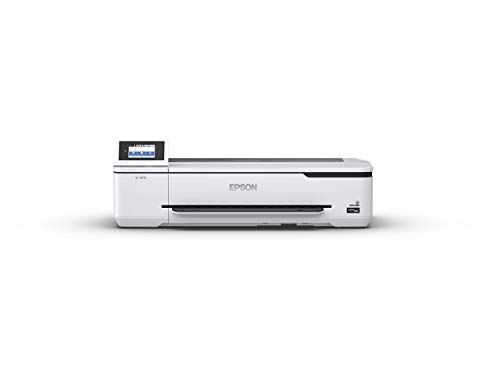
3. Epson SureColor T3170 24-Inch Desktop Wireless Poster CAD Plotter — Best for Speed and Throughput
If print speed is a hard requirement — and for busy practices running multiple drawing sets per day, it often is — the Epson SureColor T3170 is the standout performer among 24-inch desktop plotters in 2026. Epson's published A1/D-size print time of 34 seconds is genuinely fast for this format, and our hands-on experience confirmed those numbers hold up under real CAD workloads. This is a meaningful advantage when the afternoon deadline involves printing a full permit set rather than a single drawing. The time savings stack up fast.
The T3170 uses Epson's PrecisionCore printhead — a piezoelectric technology that offers consistent droplet placement across the full print width. All-pigment inks contribute to output that resists fading and handles casual handling without smearing, which matters when drawings move between hands on a job site. The 4.3-inch color LCD touchscreen makes operation intuitive even for staff who aren't the primary IT contact. Media handling is capable, supporting both roll and cut sheet configurations. The compact footprint is a genuine selling point: this machine fits on a standard desk without dominating the workspace.
The T3170 does carry a higher upfront cost than the HP T210 or T230. Epson's pigment ink cartridges also need periodic replacement, and the cartridge yield per set is worth calculating against expected monthly print volume. That said, the combination of speed, ink quality, and desktop-friendly design makes it one of the most well-rounded options on this list for practices that print frequently and want consistent, professional output from a machine that doesn't require a dedicated room.
Pros:
- 34-second A1/D-size print speed — fastest in the 24-inch desktop category
- PrecisionCore piezo printhead delivers accurate, consistent line quality
- All-pigment inks resist fading and smearing on job site documents
- Intuitive 4.3-inch color LCD touchscreen
- Compact desktop footprint with optional stand
Cons:
- Higher upfront price than the HP T230/T210
- Ink costs require monitoring for high-volume studios
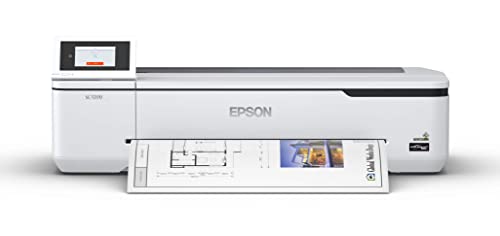
4. Epson SureColor T2170 24-Inch Desktop Wireless Poster CAD Plotter — Best Compact Budget Option
The Epson SureColor T2170 occupies a smart middle ground between entry-level HP plotters and the faster, pricier T3170. It shares the same PrecisionCore printhead technology and all-pigment ink system as its sibling, which means output quality and ink durability are essentially equivalent between the two Epson models on this list. The practical difference comes down to speed: the T2170 prints an A1/D-size drawing in approximately 43 seconds versus the T3170's 34 seconds. For most solo practitioners or two-person studios, that gap is negligible in day-to-day use.
The 4.3-inch color LCD touchscreen appears on both Epson models and remains one of the better operator interfaces in this product category. It simplifies media loading, ink status checks, and job management in a way that the button-based controls on some competing plotters don't quite match. The T2170 also carries Epson's high-capacity cartridge options — up to 50 mL for color and 80 mL for black — which is a meaningful advantage for anyone who wants to reduce the frequency of cartridge swaps during active project periods.
Media handling covers roll feed and cut sheets, with wireless and USB connectivity as standard. Setup is clean and comparable to the T3170 experience. Where the T2170 represents a genuine value play is for practices that want Epson's ink quality and interface refinement without paying for the T3170's speed premium. Anyone printing full project sets daily will likely want the faster model. But for moderate print volumes — perhaps two to five full drawing sets per week — the T2170 is a composed, capable machine that costs noticeably less.
Pros:
- Same PrecisionCore printhead and pigment ink quality as the T3170
- High-capacity cartridges (up to 80 mL black) reduce swap frequency
- 4.3-inch touchscreen is among the best operator interfaces in the class
- Lower price than the T3170 for budget-conscious buyers
Cons:
- Slower A1/D-size print time (43 sec vs. T3170's 34 sec)
- No bundled extended warranty
5. HP DesignJet T650 Large Format 36-inch Plotter Printer — Best for High-Volume Studios
The HP DesignJet T650 is where this list steps up from 24-inch desktop territory into genuine production-grade wide-format printing. At 36 inches, it opens up the full ANSI E and ISO A0 format range that larger architectural and engineering projects regularly demand. This is the machine we'd recommend for any practice regularly producing presentation boards, site plans, or large-scale construction documents where a 24-inch plotter creates unnecessary tiling and assembly work. The T650 handles those formats natively and cleanly.
HP includes a 2-year onsite warranty care pack with this model — the same comprehensive support tier as the T230, with next-business-day service and HP-certified technicians. For a machine at this investment level, that matters. The T650 also ships with an automatic sheet feeder included in the box rather than as an optional accessory, which adds convenience for mixed-format workflows. Print quality on technical line drawings is excellent: precise, accurate linework that holds up across the media types architects and engineers commonly use, from standard bond to coated presentation papers.
The T650 is a large machine. It needs either a dedicated stand (sold separately, or included in some bundles) or a substantial bench surface. Ink costs scale with the wider format, and studios printing at high volumes should calculate per-print running costs carefully before committing. That said, for a 36-inch plotter with this level of professional capability and a meaningful warranty backstop, HP has priced the T650 competitively within its class. It's the logical upgrade path for any studio that has outgrown a 24-inch unit.
Pros:
- 36-inch format handles ANSI E and A0 natively — no tiling required
- Includes 2-year onsite warranty care pack with next-business-day service
- Automatic sheet feeder included (not an optional add-on)
- Strong CAD line quality and precision on architectural media types
Cons:
- Requires significant dedicated floor or bench space
- Higher ink running costs at 36-inch format scale
- Stand sold separately in most configurations
6. Canon imagePROGRAF TM-300 36-inch 5-Color Inkjet Printer Plotter — Best for Color-Critical Work
The Canon imagePROGRAF TM-300 is the only 5-color inkjet plotter on this list — a distinction that makes a real difference when color accuracy matters as much as line precision. Canon's LUCIA TD pigment ink set covers a wider gamut than standard 4-color CMYK plotters, which means richer, more accurate color reproduction on presentation renders, site visualization boards, and any output where color fidelity is part of the deliverable. For architectural practices that regularly produce client-facing presentation work alongside technical drawings, the TM-300's color performance is a genuine competitive advantage.
At 36 inches, it handles the same large-format range as the HP T650, with WiFi connectivity built in and a compact footprint for its format class. Canon has managed to keep the physical profile smaller than many competing 36-inch machines, which is a meaningful quality-of-life improvement for studios where floor space is genuinely constrained. Setup and software integration are well-regarded in Canon's professional plotter line, and the machine works cleanly with both Windows and macOS environments across the major CAD and design application suites.
The TM-300 runs on LUCIA TD pigment inks across all five channels, providing output that holds its appearance over time on both technical and presentation media. The trade-off versus the HP T650 is primarily on warranty coverage — the TM-300 doesn't include a bundled extended onsite care pack, meaning post-purchase support runs through standard Canon service channels. For studios running the TM-300 as a primary production machine, a third-party extended service plan is worth investigating. Print speed is competitive for the 36-inch class without being a standout. The color story is where this machine earns its place. For practices that also produce large-format printed materials like posters and signage, our guide to printing to the edge of paper covers borderless output techniques worth knowing.
Pros:
- 5-color LUCIA TD pigment ink system delivers superior color gamut and accuracy
- 36-inch format with compact footprint relative to competitors
- WiFi connectivity with strong multi-platform software support
- Excellent for mixed technical and presentation print workflows
Cons:
- No bundled onsite warranty — standard Canon service channels only
- 5-color ink system increases running costs compared to 4-color competitors
7. HP DesignJet Studio Wood Large Format Plotter Printer 24" — Best for Design Studio Aesthetics
The HP DesignJet Studio Wood is unlike anything else on this list, and intentionally so. HP designed it for the growing segment of architects and design professionals who care about the visual environment of their workspace as much as functional output. The warm wood accent panels and refined industrial aesthetic set it apart from every other large-format plotter on the market — it looks at home in a design studio, a client-facing workspace, or a modern office in a way that conventional plotters simply don't. HP has even positioned it as a net carbon neutral product, which matters for practices with sustainability commitments.
Behind the design-forward exterior, the Studio Wood delivers professional 24-inch print capability that matches the T230 in core technical performance. It handles roll media up to 24 inches wide and sheet media up to 13×19 inches with the included automatic sheet feeder — the same configuration as the T230 and T210. Wireless connectivity and HP's mobile app integration are fully present, and the machine's CAD output quality is consistent with what we expect from the DesignJet T-series line. This is a serious printer, not a style accessory that sacrifices capability for looks.
Where the Studio Wood genuinely differentiates itself in terms of value is the warranty: HP includes a 3-year comprehensive care pack — the longest warranty coverage on this list by a full year over the T230 and T650. That includes remote technical support, onsite service with HP-certified technicians, and genuine HP parts. No hidden fees. Support is available seven days a week for the virtual assistant channel, and Mon–Fri for remote and onsite. For practices that want to minimize maintenance friction and can justify the premium, the Studio Wood bundles meaningful long-term peace of mind into a machine that doubles as a design statement. The price is the highest of the 24-inch models reviewed here, but the warranty and aesthetic differentiation make the math reasonable for the right buyer.
Pros:
- 3-year onsite warranty care pack — best coverage on this list
- Distinctive wood accent design suits client-facing and design studio environments
- Includes automatic sheet feeder in the box
- Net carbon neutral product for sustainability-minded practices
- Full HP DesignJet T-series print quality and wireless connectivity
Cons:
- Highest price among the 24-inch models on this list
- 24-inch format limit — not the right choice if A0 output is a regular need
What to Look For When Buying an Architectural Plotter in 2026
Print Width: 24-Inch vs. 36-Inch
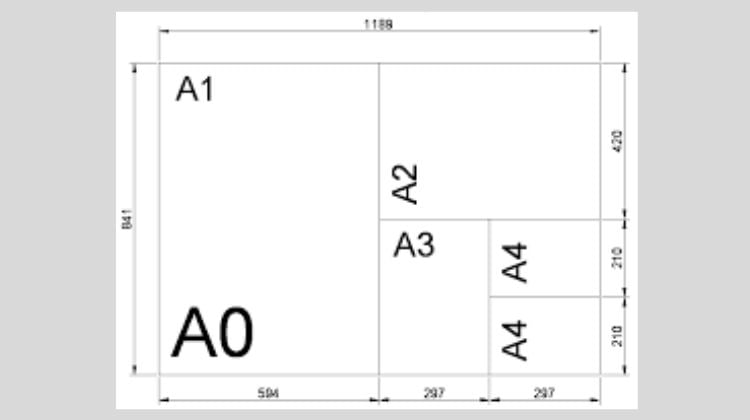
The single most consequential decision when choosing a large-format plotter for architectural work is print width. A 24-inch machine handles ANSI B, C, and D sizes (and ISO A3, A2, A1) cleanly from a roll. That covers the vast majority of permit sets, construction documents, and working drawings that a small-to-medium practice produces. The footprint, price, and running costs are all lower than a 36-inch unit, which makes 24-inch the practical default for solo practitioners and small firms.
The case for 36-inch opens up when ANSI E or ISO A0 output is a regular requirement — large site plans, master planning boards, full construction sets for complex projects. A 36-inch plotter like the HP T650 or Canon TM-300 eliminates the tiling and assembly that a 24-inch machine forces when output exceeds its width. Practices that produce A0 work even occasionally will find the 36-inch investment pays back quickly in time savings and presentation quality.
Ink Technology: Thermal vs. Piezoelectric
The HP DesignJet models on this list use thermal inkjet heads, while the Epson SureColor models use piezoelectric (PrecisionCore) technology. For technical CAD drawing output, both produce excellent results in real-world use. Piezo technology tends to offer slightly more precise droplet control and can be more efficient with ink at higher print volumes. Thermal heads typically cost less to manufacture, which contributes to the more accessible pricing of HP's T210 and T230. The Canon TM-300 uses piezo heads as part of its LUCIA TD ink system.
For practices primarily printing technical line drawings on bond paper, the thermal vs. piezo distinction is rarely a deciding factor in output quality. It becomes more relevant when color presentation output is a significant portion of the workload — in which case the Canon TM-300's 5-color pigment system and the Epson T3170's pigment ink durability merit closer attention.
Warranty and Ongoing Support
A large-format plotter is infrastructure-level equipment in a working practice. When one fails mid-project, the impact on deadlines and client commitments is immediate. We weigh warranty coverage heavily when evaluating plotters in this price range, which is why machines like the HP T230, T650, and Studio Wood earn extra credit for their bundled onsite care packs. Next-business-day service commitments matter in a professional context in a way they don't for consumer electronics.
For models without bundled extended coverage — the T210, both Epson units, and the Canon TM-300 — a third-party extended service agreement is worth calculating into the purchase decision. The cost of a single service call on a 36-inch plotter can approach or exceed a year of extended warranty coverage for that machine.
Connectivity and Software Compatibility
Every model on this list supports wireless connectivity, which is the baseline expectation in 2026. More relevant for architectural workflows is software compatibility. AutoCAD, Revit, SketchUp, and Adobe Acrobat Pro are the common print sources in a typical practice, and all seven machines reviewed here work reliably with those applications via standard PCL3GUI and HP-GL/2 drivers. The HP models have the advantage of tight native integration with Autodesk products specifically, which can simplify print queue management on busy project days.
Mobile printing support via HP's Smart app and Epson's iPrint app adds workflow flexibility for practices where drawings are often reviewed and sent to print from tablets or phones on job sites. It's a convenience feature rather than a core capability, but worth noting for anyone who manages printing remotely.
Questions Answered
What is the difference between an A3 printer and a large-format plotter for architecture?
An A3 printer typically refers to a desktop unit capable of printing up to 297 × 420 mm (A3 size), which covers common document and presentation formats but falls short of the full drawing sheet sizes architects regularly use for construction documents. A large-format plotter handles roll media up to 24 or 36 inches wide, enabling ANSI D, E, and ISO A1/A0 output in a single print. For serious architectural work involving permit sets, site plans, and full construction drawings, a plotter is the appropriate tool — an A3 desktop printer requires tiling or reduction for those formats.
Which is better for architectural CAD printing: HP DesignJet or Epson SureColor?
Both product lines are strong choices for architectural CAD work, and our team found line quality from both families excellent for technical drawing output. HP DesignJet models tend to offer better bundled warranty coverage and tighter native integration with Autodesk software. Epson SureColor models, particularly the T3170, offer faster print speeds and pigment ink durability that holds up well on frequently handled documents. Practices that prioritize speed and ink longevity often prefer Epson; those that prioritize support coverage and Autodesk ecosystem alignment tend to lean toward HP.
Do architects need a 24-inch or 36-inch plotter?
For most solo architects and small firms handling standard permit and construction documentation, a 24-inch plotter is sufficient — ANSI D (24×36 inches) is the largest format most municipalities require for permit submissions, and a 24-inch roll plotter handles that natively. Firms that regularly produce A0 or ANSI E format drawings for large-scale projects, master planning, or presentation work will benefit meaningfully from a 36-inch machine. We generally recommend starting with a 24-inch model unless 36-inch output is an immediate, documented need.
How important is print speed for an architectural plotter in 2026?
Print speed matters most in studios with high daily print volume — typically four or more full drawing sets per day. For those environments, the Epson T3170's 34-second A1 time creates a compounding time advantage over a full workday. For practices printing one to three sets daily, the speed differences between models on this list are unlikely to affect workflow in a meaningful way. Speed becomes a tiebreaker rather than a primary selection criterion for most buyers in this category.
What media types can these plotters handle?
All seven models reviewed support standard bond paper rolls — the workhorse media for everyday CAD printing. Most also support coated presentation papers, matte film, and various specialty media for higher-quality output. The HP and Epson models in the 24-inch range are tested and certified with a range of HP and Epson-branded roll media respectively, though most accept compatible third-party media as well. For practices working with translucent media for overlay drawings, the considerations are slightly different — worth reviewing our vellum printing guide for additional context on media handling in architectural workflows.
Is the Canon imagePROGRAF TM-300 worth the premium over HP DesignJet models?
For practices whose output is predominantly technical CAD line drawings, the Canon TM-300's 5-color ink advantage is not strongly differentiated — the HP T650 produces excellent technical output at a comparable price point and with stronger bundled warranty coverage. The TM-300 earns its premium when presentation color quality is a meaningful part of the workload: client renders, site visualization boards, marketing materials, or any output where color accuracy and gamut width matter. Our team considers the TM-300 the best choice specifically for mixed technical and color presentation workflows in the 36-inch class.
Buy on Walmart
- HP DesignJet T230 Large Format 24-inch Plotter Printer, Incl — Walmart Link
- HP DesignJet T210 Large Format 24-inch Color Plotter Printer — Walmart Link
- Epson SureColor T3170 24-Inch Desktop Wireless Poster CAD Pl — Walmart Link
- Epson SureColor T2170 24-Inch Desktop Wireless Poster CAD Pl — Walmart Link
- HP DesignJet T650 Large Format 36-inch Plotter Printer, Incl — Walmart Link
- Canon imagePROGRAF TM-300 36-inch 5-Color Inkjet Printer Plo — Walmart Link
- HP DesignJet Studio Wood Large Format Plotter Printer - 24", — Walmart Link
Buy on eBay
- HP DesignJet T230 Large Format 24-inch Plotter Printer, Incl — eBay Link
- HP DesignJet T210 Large Format 24-inch Color Plotter Printer — eBay Link
- Epson SureColor T3170 24-Inch Desktop Wireless Poster CAD Pl — eBay Link
- Epson SureColor T2170 24-Inch Desktop Wireless Poster CAD Pl — eBay Link
- HP DesignJet T650 Large Format 36-inch Plotter Printer, Incl — eBay Link
- Canon imagePROGRAF TM-300 36-inch 5-Color Inkjet Printer Plo — eBay Link
- HP DesignJet Studio Wood Large Format Plotter Printer - 24", — eBay Link
The right plotter is the one that matches the format, volume, and support needs of the practice — not the one with the most impressive spec sheet.



About Chris & Marry
Chris and Mary are a couple with a shared background in graphic design and print production who have spent years working with printers across creative and professional contexts — from art printing and photo output to label production and professional document work. Their combined experience evaluating printer performance, color accuracy, and paper handling across inkjet and laser platforms gives them a practical, hands-on perspective on what makes a printer worth buying. At ShopChrisAndMary, they cover printer reviews, buying guides, and recommendations for artists, photographers, and professional users.
Time to get FREE Gifts. Or latest Free printers here.
Disable Ad block to reveal all the info. Once done, hit a button below