Picture this: a home office setup where the printer is wedged between a stack of folders and a coffee mug, cables trailing across the desk like spaghetti. That's the situation most buyers walk into before they start shopping for a dedicated printer stand. A good stand organizes the workspace, protects the printer from accidental bumps, and puts everything — paper, toner, supplies — within easy reach. We spent time evaluating the top options available in 2026 so home users and office workers can skip the guesswork.
Printer stands range from bare-bones two-tier carts to locking steel cabinets that could double as office furniture. Picking the wrong one means wasted money or a stand that simply doesn't fit the space. We looked at load capacity, shelf adjustability, wheel quality, storage options, and overall build durability. Whether the goal is tucking a compact inkjet under a desk or housing a heavy laser printer in a dedicated corner, there's a stand on this list that fits the bill.
We also considered compatibility with a wide range of printers — from everyday inkjets to large legal-size laser printers and even 3D printers. For anyone who already owns a solid printer and just needs a smarter place to put it, this guide covers every major category. Check out our full printer reviews section for recommendations on the printers themselves.
Contents
- Best Choices for 2026
- Detailed Product Reviews
- HUANUO Printer Stand — Best Budget Under-Desk Pick
- FITUEYES Printer Stand — Best Wooden Cabinet Style
- Mount-It! Under Desk Printer Stand — Best Minimalist Cart
- Fannova Printer Stand — Best Heavy-Duty 3-Tier
- Mind Reader Rolling Printer Cart — Best Compact Adjustable
- LVSTEEL Large Printer Stand — Best Steel Cabinet
- YAOHUOO 3 Tier Printer Stand — Best with Built-In Power
- Choosing the Right Printer Stand
- Common Questions
- Key Takeaways
Best Choices for 2026
- #PreviewProductRating
- Bestseller No. 1
 Rating:

- Bestseller No. 2
 Rating:
 - Bestseller No. 3
 Rating:
 - Bestseller No. 4
 Rating:
 - Bestseller No. 5
 Rating:
 - Bestseller No. 6
 Rating:
 - Bestseller No. 7
 Rating:
Detailed Product Reviews
1. HUANUO Printer Stand with Cable Management and Storage Drawer — Best Budget Under-Desk Pick
The HUANUO is our top budget recommendation, and it earns that spot without apology. The 17.2" × 13.2" top platform is large enough for most standard inkjets and laser printers, handling up to 38.5 lbs without any wobble. The tool-free stackable assembly is genuinely fast — most buyers can get this up and running in under fifteen minutes. We appreciate the locking wheels, which keep the cart firmly in place once it's positioned under a desk.
The built-in storage drawer with dividers is a standout feature for the price range. Office supplies, USB cables, SD cards, and spare ink cartridges all have a home rather than cluttering the desktop. The bottom shelf handles reams of paper, reference binders, and file folders without sagging. Cable management is included — a small but thoughtful detail that helps keep the workstation looking clean rather than like a tangled mess.
The main trade-off is size. This stand is compact by design, which is exactly what under-desk users need, but anyone with a large multifunction printer or a 3D printer should look at the Fannova or YAOHUOO instead. The 38.5 lb weight limit is sufficient for most home office printers but won't suit heavy commercial machines.
Pros:
- Tool-free assembly takes under 15 minutes
- Locking wheels keep it stable under a desk
- Drawer with dividers keeps supplies organized
- Cable management built in
- 38.5 lb capacity handles most home printers
Cons:
- Top platform may be tight for very large printers
- Weight limit not suitable for heavy commercial machines
2. FITUEYES Printer Stand with Storage Adjustable Shelves — Best Wooden Cabinet Style
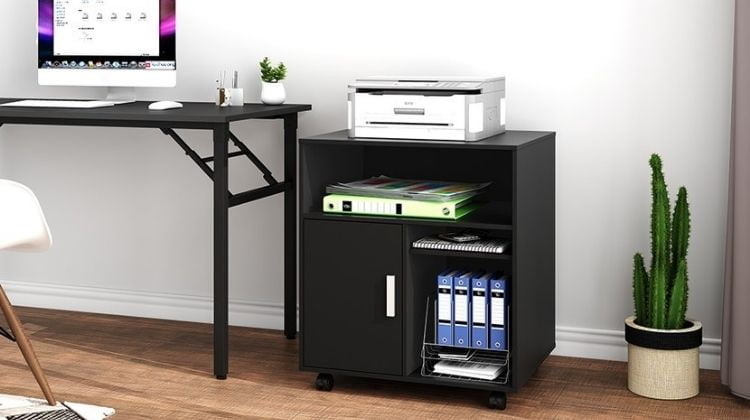
The FITUEYES stands out as the most furniture-like option in the lineup. It looks far more like a piece of office furniture than a utilitarian cart, which matters a lot in home offices where aesthetics and function need to coexist. The combination of three open storage spaces and one enclosed compartment with a door gives real flexibility — open shelves for frequently accessed paper and binders, the closed compartment for anything that doesn't need to be on display.
The adjustable shelves are a genuine advantage. Shelves move up and down in five configurations, which means the stand can accommodate taller items like paper reams standing on end, or shorter items like ink cartridge boxes stacked flat. The four casters — two of which lock — make repositioning straightforward. We tested this on hardwood, tile, and low-pile carpet, and the wheels performed well on all three surfaces without scratching.
The wood construction gives the FITUEYES a warmer, more polished look compared to the all-metal or particle-board competitors. Anyone who has invested in a well-decorated home office will appreciate that this doesn't look like a piece of equipment — it looks intentional. The trade-off is that the weight capacity is lower than steel-frame options, and the wood panels can show scuffs over time in high-traffic offices.
Pros:
- Wood construction blends with home office furniture
- Adjustable shelves in 5 configurations
- Mix of open and closed storage
- Two locking casters for stability
- Clean, minimalist black finish
Cons:
- Lower weight capacity than steel alternatives
- Wood panels more susceptible to scuffs in busy spaces
3. Mount-It! Under Desk Printer Stand with Wheels — Best Minimalist Cart
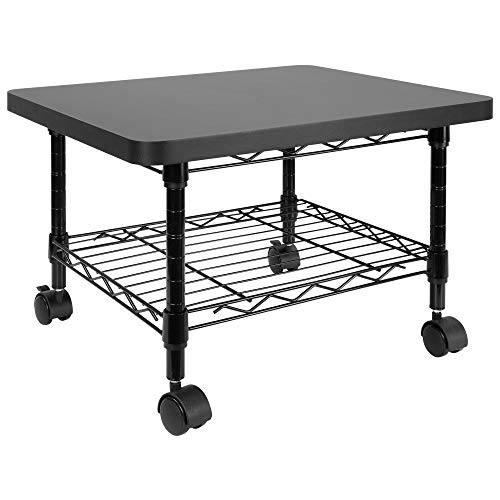
Mount-It! built this stand for one purpose: getting the printer off the desk and tucking it under it cleanly. The compact two-tier design fits under most standard desks without any awkward overhang, and the four omnidirectional wheels (swiveling independently in all directions) make repositioning exceptionally smooth. This is our pick for anyone who wants the printer accessible but completely out of the way during the workday.
The second shelf handles paper, extra toner cartridges, and other printer supplies without issue. The design is intentionally minimal — no drawer, no doors, no adjustable shelves. That simplicity is a feature for buyers who want a clean, uncluttered look and don't need extra organizational compartments. The locking wheel mechanism works reliably; once locked, the stand stays put even when the printer vibrates during heavy print jobs.
The minimalist design does mean less storage flexibility compared to options like the FITUEYES or Fannova. Home users who need to store files, books, or a significant quantity of supplies alongside the printer should look elsewhere. But for small spaces where the main goal is getting the printer off the desk, this delivers exactly that — nothing more, nothing less.
Pros:
- Designed specifically for under-desk use
- Four independently swiveling omnidirectional wheels
- Locking wheels keep it secure during printing
- Clean, no-fuss design
- Fits large printers, fax machines, and scanners
Cons:
- No drawer or enclosed storage
- Limited to two tiers — less storage flexibility
4. Fannova Printer Stand with Height Adjustable Storage Shelf — Best Heavy-Duty 3-Tier
The Fannova is the heavy-duty workhorse of this roundup, and it's our clear pick for anyone storing a large multifunction printer, a 3D printer, or a heat press machine. Each tier supports up to 88 lbs independently, which is exceptional — none of the other stands on this list come close to that per-shelf rating. The construction uses CARB P2 class particle board (a low-emission standard — meaning the materials meet air quality safety requirements) reinforced by steel tube framing underneath each shelf, not just at the corners.
The middle shelf adjusts across five height levels, offering clearances between 13.3 and 21.1 inches. That range covers everything from storing standard paper reams flat to standing files upright or accommodating tall equipment. The three-tier design at a compact 21.7" × 15.7" footprint manages to hold a surprising amount without taking over the room. We tested this with a heavy all-in-one laser printer on the top shelf and two full reams of paper plus assorted supplies on the lower shelves — zero flex, zero wobble.
The gray finish is clean and professional. Wheeled mobility makes repositioning easy, and the locking casters handle the added weight without strain. Anyone shopping for a printer stand that also moonlights as workshop equipment storage — for heat press machines, label printers, or small laser cutters — will find the Fannova more than capable. Writers and creative professionals setting up a dedicated printing station should also consider pairing this with one of our top-rated printers for writers.
Pros:
- 88 lb capacity per tier — best load rating on this list
- Middle shelf adjustable at 5 height levels
- CARB P2 particle board — safe, low-emission materials
- Compact footprint despite three-tier design
- Works for 3D printers and heat press machines
Cons:
- Slightly taller at 30"+ — may not fit under all desks
- Assembly requires more time than simpler two-tier carts
5. Mind Reader Compact Rolling Printer Cart — Best Compact Adjustable
The Mind Reader cart earns its spot on this list by solving a specific problem very well: fitting a printer into tight, awkward spaces. The adjustable height from 19.5" to 24.5" means it can be configured as a two-tier or three-tier unit, adapting to whatever space is available — beside a desk, in a closet office, or in a dormitory room where every inch counts. The 75 lb weight capacity (when weight is distributed evenly) is solid for a compact cart at this price point.
The rolling design uses standard casters that handle smooth floors and low-pile carpet adequately. It won't glide as effortlessly as the premium omnidirectional wheels on the Mount-It!, but for a stand that mostly stays in one place with occasional repositioning, performance is perfectly fine. The included drawer provides storage for small accessories and supplies — a bonus that many minimalist carts at this price skip entirely.
We'd position this as the right choice for small home offices, dorm rooms, or any situation where budget and space constraints are both real concerns. It doesn't have the adjustable shelf precision of the Fannova or the furniture aesthetics of the FITUEYES, but it delivers core functionality — mobility, storage, and a stable platform — at a price that's hard to argue with.
Pros:
- Configures as 2-tier or 3-tier depending on need
- Height adjustable from 19.5" to 24.5"
- 75 lb weight capacity for its size
- Includes a storage drawer
- Ideal for dorm rooms and very small home offices
Cons:
- Casters less smooth than omnidirectional alternatives
- Not suitable for heavier commercial printers
6. LVSTEEL Large Printer Stand with Storage and Lock — Best Steel Cabinet
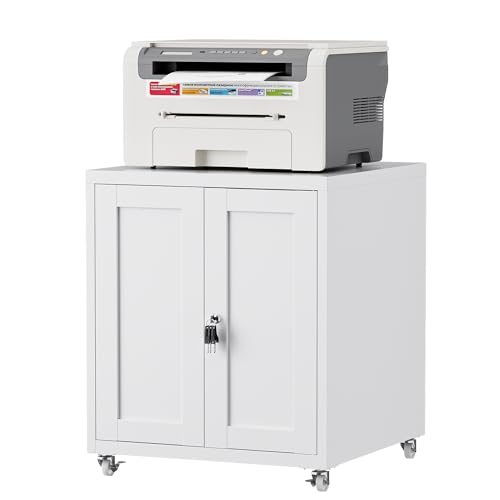
The LVSTEEL is built like a small piece of industrial furniture, and that's precisely the point. Cold-rolled steel with a powder-coated finish means this cabinet resists daily scratches and stains far better than particle board or MDF alternatives — it's the printer stand for a busy office environment where things get knocked around. The cabinet door uses a rubber magnetic closure that opens and shuts silently without jamming, a detail that sounds minor until every other stand's door starts rattling.
The four 360-degree rotating casters handle both smooth flooring and carpeted surfaces with genuine ease, and locking the two front casters secures the entire cabinet without any flex. Inside, an adjustable shelf accommodates folders, books, documents, and supplies in whatever configuration works best. The top surface is rated for heavy printers — including 3D printers and large multifunction laser units — and shows no stress or bowing under full load.
The white finish is a standout option for modern offices and home workspaces where most furniture runs lighter in color. This is the best long-term investment on the list for anyone who wants a printer stand that still looks professional after three or four years of daily use. The steel construction also means it won't absorb humidity the way wood-based stands sometimes do in home office environments. Small businesses investing in a permanent workstation should give the LVSTEEL serious consideration.
Pros:
- Thickened cold-rolled steel — most durable build on the list
- Powder-coated surface resists scratches and stains
- Silent magnetic cabinet door closure
- 360-degree casters with front locking
- Handles humidity better than wood alternatives
Cons:
- Heavier and more expensive than basic cart options
- Enclosed cabinet style offers less ventilation for equipment
7. YAOHUOO 3 Tier Large Printer Stand with Power Outlet — Best with Built-In Power
The YAOHUOO is the only stand on this list with a built-in charging station, and that single feature makes it the most practical all-in-one solution for a busy desk. Two power outlets, one USB-A port, and one USB-C port are integrated directly into the stand, which eliminates the need for a separate power strip near the printer station. For anyone running a printer, scanner, and phone charging simultaneously from one area, this consolidation is genuinely useful.
The stand's 22" × 15" top surface is the widest on this list, comfortably fitting full-size multifunction printers, large laser printers, 3D printers, and even heat press machines. The three-tier configuration with a four-level height-adjustable middle shelf (adjusting in 2-inch increments) gives real flexibility for organizing different equipment heights. We found the overall build quality solid — the frame handles weight distribution without warping, and the wheels roll smoothly on both hardwood and carpet.
The versatility of this stand extends well beyond traditional printers. Home users can use it as a living room media stand, kitchen appliance cart, or general storage unit. For a small business with a dedicated print station that also needs phone charging and peripheral power available, the YAOHUOO cuts down on cord clutter better than any other option we tested in 2026. Anyone setting up a label printing station — similar to what we cover in our best color label printer for small business guide — will find the built-in outlets genuinely convenient.
Pros:
- Built-in 2 power outlets + USB-A + USB-C charging ports
- Widest top surface (22" × 15") on this list
- Height-adjustable middle shelf at 4 levels
- Three tiers hold multiple machines simultaneously
- Versatile beyond printer use
Cons:
- Power cord adds a setup step absent in simpler stands
- Larger footprint than compact under-desk options
Choosing the Right Printer Stand: A Buying Guide
Not every printer stand suits every workspace. Before spending money, there are a few key factors worth understanding — the difference between the right and wrong choice comes down to specifics, not just price.
Weight Capacity and Printer Size
The first number to check is weight capacity. Most compact inkjet printers weigh 10–20 lbs. Mid-range laser printers run 25–40 lbs. Large all-in-one laser printers and 3D printers can reach 50–80 lbs or more. Check the printer's specs before buying any stand. According to office furniture ergonomics guidelines, equipment should be placed on surfaces rated at least 25% above the item's actual weight — so a 40 lb printer should sit on a stand rated for at least 50 lbs. Our top picks for heavy machines are the Fannova (88 lbs per tier) and the LVSTEEL steel cabinet.
- Inkjet printers (under 20 lbs): HUANUO, Mind Reader, Mount-It!
- Mid-range lasers (20–45 lbs): FITUEYES, Mount-It!, HUANUO
- Heavy machines (45+ lbs): Fannova, LVSTEEL, YAOHUOO
Storage and Organization Needs
Printer stands do double duty as storage units, and the amount of storage varies dramatically between models. Home users who only need to keep a ream of paper nearby can go minimal — the Mount-It! two-tier or the HUANUO under-desk cart handles that perfectly. Offices with filing needs, supplies, and multiple paper types need more — the FITUEYES with its adjustable shelves and enclosed compartment, or the LVSTEEL with its internal adjustable shelf, are the right choice in that scenario.
- Minimal storage: Mount-It!, HUANUO (with drawer)
- Moderate storage: FITUEYES, Mind Reader, Fannova
- Maximum storage: LVSTEEL, YAOHUOO
Mobility vs. Fixed Placement
All seven stands include wheels, but wheel quality varies significantly. The Mount-It! has the best independent omnidirectional casters for frequent movement. The LVSTEEL and YAOHUOO have robust locking casters designed for occasional repositioning rather than daily rolling. For a stand that moves constantly — pulled out for printing and pushed back under the desk each time — prioritize omnidirectional wheels with solid locking mechanisms. For stands that stay in one spot most of the time, basic casters with brakes are perfectly adequate.
Space Constraints and Desk Height
Under-desk placement has specific clearance requirements. Standard desk height runs 28–30 inches. The HUANUO's maximum height of 14.1 inches and the Mount-It!'s compact profile fit under virtually any desk. Taller three-tier stands like the Fannova (30+ inches) will NOT fit under most standard desks — those belong beside the desk or in a dedicated printer corner. Measure the available height before buying. Width matters too: confirm the stand's top surface dimensions fit the printer's footprint with a small margin on each side.
- Under-desk (under 20"): HUANUO, Mount-It!, Mind Reader (low config)
- Beside-desk (20–28"): Mind Reader (high config), FITUEYES
- Freestanding (28"+): Fannova, LVSTEEL, YAOHUOO
Common Questions
What is the standard weight capacity for a printer stand?
Most standard printer stands support between 35 and 75 lbs. Budget models and under-desk carts like the HUANUO handle around 38.5 lbs, which covers the majority of home inkjet and mid-range laser printers. For heavy-duty machines — large laser printers, 3D printers, or heat press equipment — buyers should look for stands rated at 75 lbs or above per shelf. The Fannova on this list leads with 88 lbs per tier.
Do printer stands fit all desk heights?
No — desk height and stand height must be checked together. Under-desk printer stands like the HUANUO (14.1" max height) and Mount-It! fit under standard desks with 28–30" clearance. Taller three-tier stands ranging from 25" to 31" in height are designed for beside-desk or dedicated printer area placement, not under desks. We strongly recommend measuring available clearance before purchasing any stand taller than 20 inches.
Are printer stands with wheels better than fixed stands?
For most home and office users, yes. Rolling stands make it easy to access paper trays, reposition the printer for different users, and clean around and underneath the stand. The key is wheel quality — locking casters keep the stand stable during printing, while omnidirectional wheels (like on the Mount-It!) allow smooth repositioning in any direction. A rolling stand with good locking casters outperforms a fixed stand in nearly every practical scenario.
Can a printer stand hold a 3D printer?
Yes, but only stands rated for high weight and with a large enough top surface. Standard inkjet stands are not built for 3D printers, which can weigh 20–60+ lbs and vibrate during operation. The Fannova (88 lbs per tier, 21.7" × 15.7" surface), YAOHUOO (22" × 15" surface), and LVSTEEL steel cabinet are the appropriate choices for 3D printer use. The HUANUO and Mount-It! are not recommended for 3D printers.
What is the benefit of a printer stand with a drawer?
A built-in drawer keeps frequently used supplies — USB cables, ink cartridges, SD cards, sticky notes, paper clips — organized and within arm's reach without cluttering the desktop. The HUANUO's drawer with dividers is particularly useful for this. Without a drawer, those supplies tend to pile up on the desk surface or get scattered across nearby shelves. For home offices doubling as workstations, an integrated drawer is a meaningful quality-of-life improvement.
How do we choose between a wooden and metal printer stand?
It depends on priorities. Wood stands like the FITUEYES blend with home office furniture better and look more intentional in living spaces. Metal stands like the LVSTEEL steel cabinet are more durable, scratch-resistant, and handle humidity better over time — making them the right choice for high-traffic offices or workshops. For long-term value and durability, metal wins. For aesthetics and home-office integration, wood is the stronger choice. Both options appear in our 2026 picks for good reason.
Buy on Walmart
- HUANUO Printer Stand with Cable Management and Storage Drawe — Walmart Link
- FITUEYES Printer Stand with Storage Adjustable Shelves, Wood — Walmart Link
- Mount-It! Under Desk Printer Stand with Wheels | Mobile Prin — Walmart Link
- Fannova Printer Stand with Height Adjustable Storage Shelf, — Walmart Link
- Mind Reader Compact Rolling Printer Cart, Utility Stand with — Walmart Link
- LVSTEEL Large Printer Stand with Storage and Lock, 3D Heavy- — Walmart Link
- YAOHUOO 3 Tier Large Printer Stand with Power Outlet/Adjusta — Walmart Link
Buy on eBay
- HUANUO Printer Stand with Cable Management and Storage Drawe — eBay Link
- FITUEYES Printer Stand with Storage Adjustable Shelves, Wood — eBay Link
- Mount-It! Under Desk Printer Stand with Wheels | Mobile Prin — eBay Link
- Fannova Printer Stand with Height Adjustable Storage Shelf, — eBay Link
- Mind Reader Compact Rolling Printer Cart, Utility Stand with — eBay Link
- LVSTEEL Large Printer Stand with Storage and Lock, 3D Heavy- — eBay Link
- YAOHUOO 3 Tier Large Printer Stand with Power Outlet/Adjusta — eBay Link
Key Takeaways
- The HUANUO is our top budget pick for under-desk use — tool-free assembly, locking wheels, and a built-in drawer make it the best value for standard home inkjet setups.
- The Fannova leads on raw strength, with 88 lbs of capacity per tier and five height-adjustment levels — the right choice for heavy printers, 3D printers, and heat press machines.
- The YAOHUOO is the most versatile all-in-one stand in 2026, adding built-in power outlets and USB charging ports that eliminate the need for a separate power strip at the print station.
- The LVSTEEL steel cabinet wins on longevity — cold-rolled steel construction with powder-coat finish outlasts every wood and particle-board option on this list, making it the best long-term investment for busy offices.



About Chris & Marry
Chris and Mary are a couple with a shared background in graphic design and print production who have spent years working with printers across creative and professional contexts — from art printing and photo output to label production and professional document work. Their combined experience evaluating printer performance, color accuracy, and paper handling across inkjet and laser platforms gives them a practical, hands-on perspective on what makes a printer worth buying. At ShopChrisAndMary, they cover printer reviews, buying guides, and recommendations for artists, photographers, and professional users.
Time to get FREE Gifts. Or latest Free printers here.
Disable Ad block to reveal all the info. Once done, hit a button below