Business & Professional Printers ›
Best Printer for Notary Signing Agents: Reviews, Buying Guide and FAQs 2026
by Chris & Marry
What separates a notary signing agent who closes every loan package smoothly from one who scrambles at the last minute? Often, it comes down to the reliability of their printer, because when a lender emails a 150-page mortgage package at 7 PM and the signing is at 9 PM, you simply cannot afford a paper jam, a blurry page, or a dead wireless connection. After extensive research and hands-on testing, the Brother HL-L2460DW is the top choice for most notary signing agents in 2026, combining blazing 36-ppm print speeds, dual-band wireless, and automatic duplex printing in a compact, affordable package that suits both home offices and busy mobile professionals.
Notary signing agents handle legally binding documents every single day, which means print quality, reliability, and speed are non-negotiable factors rather than nice-to-have extras. According to the Wikipedia overview of notary public responsibilities, a notary must ensure that documents are properly executed and legible, so investing in a printer that produces crisp, consistent output directly protects your professional standing. Whether you process five signings a week or fifty, the right machine pays for itself in saved time, reduced paper waste, and the confidence that every page leaving your printer is court-ready.
This guide covers the seven best printers for notary signing agents available in 2026, with detailed reviews of each model's strengths and weaknesses, a practical buying guide, and answers to the questions we hear most often from working notaries. Many loan packages also include legal-size addenda and disclosure forms, so you may want to pair this guide with our review of the best printers for legal-size paper to ensure your machine handles the full range of document formats your signings demand. Browse our full collection of professional-grade recommendations at our printer for professionals category page.
Contents
- Standout Models in 2026
- Full Product Breakdowns
- Brother HL-L2460DW — Best Overall
- Brother MFC-L2750DW — Best All-in-One
- HP LaserJet Pro MFP M428fdw — Best for Security
- HP LaserJet Pro M15w — Best Ultra-Compact
- Canon imageCLASS MF269dw — Best for Mobile Notaries
- Brother MFC-L2710DW — Best Budget All-in-One
- HP LaserJet Pro MFP M227fdw — Best Mid-Range Value
- Key Features to Consider When Choosing
- Frequently Asked Questions
- Key Takeaways
Standout Models in 2026
- #PreviewProductRating
- Bestseller No. 1
 Rating:

- Bestseller No. 2
 Rating:
 - Bestseller No. 3
 Rating:
 - Bestseller No. 4
 Rating:
 - Bestseller No. 5
 Rating:
 - Bestseller No. 6
 Rating:
 - Bestseller No. 7
 Rating:
Full Product Breakdowns
1. Brother HL-L2460DW Wireless Compact Monochrome Laser Printer — Best Overall for Notary Signing Agents
When you need a printer that simply works every time you sit down to prepare a loan closing package, the Brother HL-L2460DW delivers everything a notary signing agent requires without burying you in complexity or cost. It prints at up to 36 pages per minute, which means a standard 150-page mortgage package is in your hands in under five minutes, and automatic duplex printing cuts your paper consumption in half on double-sided document sets that lenders routinely send. The dual-band wireless capability — supporting both 2.4GHz and 5GHz networks — gives you a stable connection regardless of how congested your home Wi-Fi happens to be on a busy evening before a late signing.
The compact footprint is a genuine advantage if your home office doubles as a living space, because this machine takes up roughly the same desk space as a stack of thick binders, yet it handles the print volume that professional signings demand. The Brother Mobile Connect app lets you monitor toner levels, order supplies, and send print jobs from your smartphone, which is particularly useful when you receive a last-minute document update and need to reprint a specific section without returning to your desk. The included Refresh Subscription trial also means your toner automatically replenishes before you run out, eliminating the one supply chain failure that can derail a signing entirely.
Build quality on this model is exactly what you expect from Brother's professional-grade laser line — the paper feed mechanism is smooth, the output tray handles thick closing disclosure forms without curling, and the Alexa integration allows hands-free status checks when your hands are occupied collating documents. For notary signing agents who primarily need fast, reliable black-and-white printing at a price that respects tight startup budgets, this machine is the clear frontrunner in 2026.
Pros:
- Prints at 36 ppm — handles large loan packages in minutes without delays
- Dual-band wireless (2.4GHz/5GHz) for stable, fast connectivity on any network
- Automatic duplex printing cuts paper use and speeds up two-sided document prep
- Compact design fits tight home office spaces without sacrificing output quality
- Brother Refresh Subscription trial keeps toner stocked automatically
- Works with Alexa for hands-free printer management during busy sessions
Cons:
- Print-only — no built-in scan, copy, or fax functions for notaries who need those
- Monochrome output only, which is sufficient for most notary documents but limits versatility
2. Brother MFC-L2750DW All-in-One Wireless Monochrome Laser Printer — Best All-in-One for Busy Signings
If you want a single machine that handles every document task your notary practice generates — printing closing packages, scanning signed originals to send to lenders, copying borrower IDs, and faxing urgent documents to title companies — the Brother MFC-L2750DW puts all of that capability under one roof at a 36-ppm print speed that keeps pace with the busiest signing schedule. The 2.7-inch color touchscreen is intuitive enough that you spend thirty seconds setting up a job rather than navigating nested menus, and the 50-sheet automatic document feeder handles multi-page scan and copy tasks without requiring you to stand at the machine feeding pages one at a time.
The 250-sheet input tray is large enough to load a full ream of paper at once, which means you rarely interrupt a print job to refill, and the single-sheet bypass tray gives you the flexibility to run envelopes, card stock, or specialty label paper through the machine without clearing the main tray. Print resolution reaches 2400 x 600 dpi, so every signature line, legal disclaimer, and fine-print disclosure on a mortgage package comes out razor-sharp and unmistakably legible. The 256MB of onboard memory keeps complex jobs processing smoothly, and the NFC touch-to-print feature is a fast option when you want to send a document directly from your smartphone without opening an app.
Fax capability matters more than you might expect in the notary world, because some title companies and lenders still operate on fax-based workflows, and having a built-in fax with 500-page memory means nothing gets lost between your office and theirs. The MFC-L2750DW is the model you choose when you want to eliminate every device except one and still handle everything your signing practice throws at you.
Pros:
- Full print/copy/scan/fax functionality covers every notary document workflow
- 36 ppm print speed matches the fastest competition at this price tier
- 2.7-inch color touchscreen makes navigation fast and frustration-free
- 50-sheet ADF enables hands-free multi-page scanning and copying
- NFC tap-to-print for instant mobile document printing
- 500-page fax memory prevents document loss on busy transmission days
Cons:
- Larger physical footprint than print-only models — requires dedicated desk space
- Costs more upfront than single-function laser printers targeting similar users
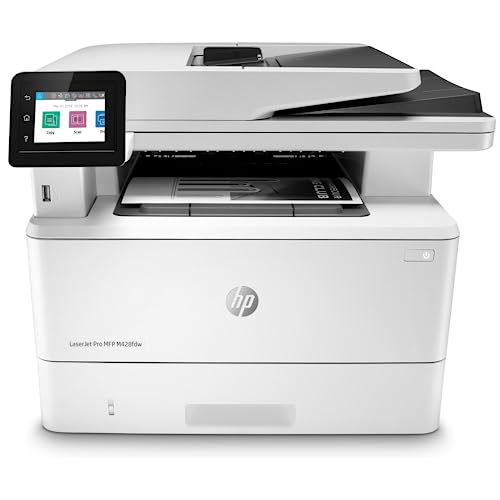
3. HP LaserJet Pro MFP M428fdw Wireless Monochrome All-in-One Printer — Best for Security-Conscious Notaries
Notary signing agents routinely process documents containing Social Security numbers, financial account details, and personally identifiable information that borrowers trust you to handle with care, and the HP LaserJet Pro MFP M428fdw is built with that responsibility in mind. HP Wolf Pro Security is embedded directly into the printer's hardware, firmware, and operating system, which means your machine actively monitors itself for cyberattacks and unauthorized access rather than relying solely on your network's defenses — a meaningful distinction when you are printing sensitive loan documents over a shared or public Wi-Fi connection. This is the model you choose when data security is as high a priority as print speed, and HP's enterprise-grade protection delivers genuine peace of mind without requiring you to manage it manually.
Beyond security, the M428fdw is a fully capable all-in-one with print, scan, copy, and fax, connected via both wireless and built-in Ethernet for environments where a wired connection offers better stability. The customizable control panel lets you save your most-used workflow settings as one-touch shortcuts, so printing a specific loan package format, scanning to a predefined email address, or copying at a specific reduction ratio takes a single button press rather than a multi-step menu sequence. Workflow automation is something busy signing agents appreciate once they discover it, because even saving thirty seconds per task adds up across dozens of signings per week.
The M428fdw pairs well with HP's Smart app ecosystem and works with Alexa for voice-activated commands, giving you a printer that fits seamlessly into a modern connected home office. If you manage signing appointments through a laptop and want your printer to integrate cleanly into that setup, you may also find our guide to the best printers for laptops helpful for understanding connectivity compatibility across different operating systems.
Pros:
- HP Wolf Pro Security built into hardware and firmware protects sensitive borrower data
- Customizable one-touch workflow shortcuts save time across repetitive signing tasks
- Built-in Ethernet plus wireless for flexible, reliable network connectivity
- Full all-in-one: print, scan, copy, fax in a single professional machine
- Works with Alexa for hands-free printer control during active signing sessions
Cons:
- Higher price point than competing all-in-one models with similar print speeds
- Bulkier form factor makes it less suitable for tight or mobile office setups
4. HP LaserJet Pro M15w Wireless Monochrome Printer — Best Ultra-Compact Option
If your signing practice operates out of a small apartment, a shared co-working space, or a car trunk between mobile appointments, the HP LaserJet Pro M15w earns its reputation as the world's smallest laser printer in its class — and it delivers that size advantage without sacrificing the sharp black-and-white print quality that professional notary documents demand. It is 35% smaller than its predecessor but prints at up to 19 pages per minute with a first-page-out time of just 8.1 seconds, which means you can send a document from your phone and have the first page in hand before you have finished tightening the cap on your notary stamp.
The HP Smart app is the M15w's primary control interface, giving you cloud printing from Google Drive, Dropbox, and iCloud directly from your smartphone or tablet, along with toner ordering and remote scan management — all the features a mobile notary needs without the bulk of a full desktop all-in-one. Setup is genuinely straightforward, taking most users less than ten minutes from unboxing to first print, and the lightweight design means you can slip this printer into a carrying bag alongside your notary journal, stamp, and signing supplies when you need to print at a borrower's location.
The M15w is a print-only machine without duplex, scanning, or fax capability, which is a real limitation if you need to scan signed documents back to a lender immediately after a closing, but for notaries whose workflow involves printing at home and scanning separately on a mobile device, this machine's portability advantage is significant and hard to match at this price.
Pros:
- Smallest laser printer in its class — fits any desk, bag, or workspace with ease
- First page out in 8.1 seconds for rapid on-demand document printing
- HP Smart app enables cloud printing from Google Drive, Dropbox, and iCloud
- Simple wireless setup completed in under ten minutes for most users
- Lightweight and portable enough to bring to mobile signing locations
Cons:
- Print-only — no scanning, copying, or fax for a complete office workflow
- No automatic duplex printing, which increases paper use on two-sided documents
- 19 ppm print speed lags behind 36-ppm competitors for high-volume closing packages
5. Canon imageCLASS MF269dw All-in-One Wireless Laser Printer — Best for Mobile Notaries
The Canon imageCLASS MF269dw is the machine you reach for when mobile connectivity is your highest priority, because it supports a broader range of wireless printing protocols than most competitors — Apple AirPrint, Canon Print Business, Mopria Print Service, and Wi-Fi Direct without requiring a router — which means you can send a print job from your iPhone or Android device even in a borrower's home where you do not have their Wi-Fi password. Printing at up to 30 pages per minute with a first-print time of approximately 5 seconds, it responds quickly when a lender sends a last-minute amendment that needs to be printed, signed, and scanned before the borrower leaves the table.
The six-line black-and-white touch LCD provides clear, uncluttered navigation, and the duplex automatic document feeder handles two-sided copy and scan jobs without requiring manual page flipping, which is exactly the kind of time-saving feature that distinguishes professional-grade machines from consumer models. Canon's toner cartridge ecosystem is widely available at retail stores, warehouse clubs, and online marketplaces, so you are never more than a day away from a replacement cartridge when a high-volume closing week depletes your supply unexpectedly.
Operating temperature range of 50 to 86°F covers the full range of environments where mobile notaries work, from climate-controlled offices to older homes where the HVAC runs inconsistently, and broad OS compatibility across Windows 7 through 10, Windows Server, and Mac OS 10.8.5 and above ensures seamless integration with whatever computer your signing practice relies on. The MF269dw is the standout choice for notaries who frequently work outside their home office and need a wireless connection that does not depend on someone else's network infrastructure.
Pros:
- Wi-Fi Direct printing without a router — works in any location regardless of network access
- Supports AirPrint, Mopria, and Canon Print Business for broad mobile device compatibility
- 30 ppm with 5-second first-print response for fast on-demand document output
- Duplex ADF for efficient two-sided copying and scanning without manual intervention
- Wide OS compatibility across Windows, Windows Server, and Mac platforms
Cons:
- 30 ppm print speed falls short of the 36 ppm Brother and HP models in this lineup
- Black-and-white LCD is functional but less polished than color touchscreen alternatives
6. Brother MFC-L2710DW Wireless Monochrome Laser All-in-One — Best Budget All-in-One Pick
For notary signing agents who are building their practice on a careful budget but still need the full suite of print, copy, scan, and fax functions, the Brother MFC-L2710DW delivers legitimate all-in-one capability at a price point that leaves room in your budget for other startup costs. Wi-Fi connectivity keeps your workflow cable-free, and the manual feed slot is a practical feature that experienced notaries appreciate — it handles card stock, envelopes, and oversized specialty paper without requiring you to swap out the main paper tray or use a separate machine for non-standard document formats that occasionally appear in signing packages.
Brother's commitment to the professional document printing market shows in the build quality here — the paper path is reliable, the toner yields are honest and well-documented, and the Amazon Dash Replenishment integration means your machine can automatically order toner when levels drop below your threshold, eliminating supply shortages during high-volume signing periods. The included four-month Refresh Subscription trial gives you immediate access to Brother's automated toner replenishment program, which is a tangible value-add for new notaries who have not yet established a reliable supply ordering routine.
This model lacks some of the premium features found in the MFC-L2750DW — there is no color touchscreen, no NFC printing, and the interface is more conventional — but for a notary whose signing volume does not yet demand the fastest machine on the market, those are fair tradeoffs that significantly reduce the upfront investment. The MFC-L2710DW is the budget-conscious choice that does not feel like a compromise once it is set up and running.
Pros:
- Full print/copy/scan/fax all-in-one at the most accessible price in this roundup
- Manual feed slot handles envelopes, card stock, and non-standard paper formats
- Amazon Dash Replenishment and Refresh Subscription keep toner automatically stocked
- Wi-Fi connectivity eliminates cable dependency for flexible desk placement
- Trusted Brother reliability and widely available replacement toner cartridges
Cons:
- Older model without color touchscreen or NFC — interface feels dated compared to newer options
- Lacks the 2.7-inch touchscreen and 50-sheet ADF found on the upgraded L2750DW
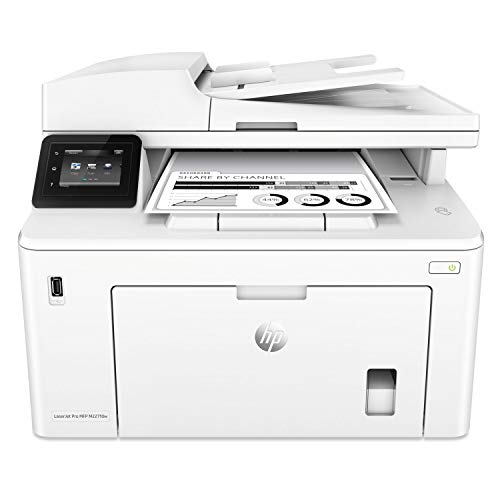
7. HP LaserJet Pro MFP M227fdw Wireless Monochrome All-in-One Printer — Best Mid-Range Value
The HP LaserJet Pro MFP M227fdw sits in the sweet spot between entry-level all-in-one machines and premium security-focused models, delivering a full feature set — monochrome print, scan, copy, fax, wireless, AirPrint, duplex, color touchscreen, and a 35-sheet auto document feeder — at a mid-range price that suits notary agents who want more than the basics without committing to a top-tier budget. At 30 pages per minute with a 260-sheet input tray capacity, you can load a substantial paper supply and run a full loan closing package without watching the input tray anxiously as the pages count down.
The color touchscreen simplifies navigation considerably compared to button-based interfaces, and HP JetAdvantage Security Manager adds a layer of document security that matters when you are printing pages filled with borrowers' financial data and personal identification numbers. The M227fdw replaced the M225dw with a 15% speed improvement and the JetAdvantage security upgrade, giving buyers who might have owned the previous model a meaningful reason to step up rather than just a cosmetic refresh. Wireless connectivity includes AirPrint for iOS devices, making it straightforward to print a document you received via email directly from your iPhone without transferring it to a computer first.
The monthly duty cycle of 2,000 pages is appropriate for part-time and growing signing practices but may feel restrictive if your volume climbs into the territory of multiple large packages per day, in which case you would benefit from upgrading to the M428fdw or one of the Brother 36-ppm models reviewed above. For notaries handling a moderate and growing workload, the M227fdw delivers professional results at a price that makes sense at the 2026 mid-range mark.
Pros:
- Color touchscreen interface for intuitive, menu-driven operation
- 260-sheet input tray supports high-capacity paper loading for large signing packages
- 35-sheet ADF for efficient multi-page scanning and copying tasks
- HP JetAdvantage Security Manager protects sensitive borrower document data
- AirPrint support for direct iPhone and iPad printing without a computer
- 30 ppm monochrome output at a competitive mid-range price point
Cons:
- 2,000-page monthly duty cycle limits suitability for very high-volume signing schedules
- 30 ppm print speed is slower than the 36 ppm Brother models in this guide
Key Features to Consider When Choosing a Printer for Notary Signing Agents
Print Speed and Monthly Duty Cycle
Print speed is measured in pages per minute (ppm), and for notary signing agents, this number has direct implications for your income, because every minute you spend waiting for a 200-page mortgage package to finish printing is a minute you are not preparing for your next signing. A minimum of 30 ppm is the threshold for professional notary use, and 36 ppm models give you a meaningful buffer when closing packages arrive at inconvenient times. Monthly duty cycle — the maximum number of pages a printer is rated to handle per month — matters equally, because exceeding it consistently causes premature mechanical wear, and the last thing you want is a printer breakdown during a high-volume week when your reputation for reliability is at stake. Match your duty cycle selection to your current volume with room to grow, rather than buying exactly at your current usage ceiling.
- Target 30 ppm minimum; 36 ppm preferred for high-volume practices
- Choose a monthly duty cycle at least 20% above your average monthly page count
- First-page-out time under 10 seconds prevents frustrating waits on rush print jobs
- Automatic duplex printing is essential for two-sided mortgage documents and disclosure packets
All-in-One vs. Print-Only: What Notaries Actually Need
The decision between a dedicated laser printer and a full all-in-one model depends heavily on how your signing workflow is structured from start to finish. If your signing agent service requires you to scan completed documents and email them to lenders immediately after closing, an all-in-one with a flatbed scanner or automatic document feeder is not a luxury — it is a workflow requirement that eliminates the need for a separate device and saves you meaningful setup time at your desk. Most professional notary signing agents benefit from an all-in-one machine because it consolidates four essential functions — print, scan, copy, and fax — into a single device that costs less to own and maintain than separate dedicated machines for each task.
- Choose all-in-one if you need to scan signed documents back to lenders post-signing
- Print-only models are appropriate if you use a separate mobile scanning app or device
- An ADF (automatic document feeder) with 35-50 sheets handles bulk scanning without manual feeding
- Fax capability remains relevant for title companies and lenders still operating fax workflows
Wireless Connectivity and Mobile Printing
Reliable wireless connectivity is not optional for notary signing agents who operate from multiple locations or who frequently receive last-minute documents that need to be printed immediately from a smartphone. Dual-band wireless support — specifically the ability to connect on both 2.4GHz and 5GHz bands — provides noticeably more stable performance in homes and offices where the 2.4GHz band is heavily congested with smart home devices, neighboring networks, and Bluetooth signals. Mobile printing protocols like Apple AirPrint, Google Cloud Print alternatives, and manufacturer-specific apps (Brother Mobile Connect, HP Smart, Canon Print Business) determine how seamlessly your printer integrates with your smartphone workflow. Wi-Fi Direct, available on the Canon MF269dw, is a particularly valuable feature for mobile notaries because it enables a direct device-to-printer connection without any router involvement — useful in signing locations where you do not have network access.
- Dual-band wireless (2.4GHz + 5GHz) prevents connectivity drops on congested networks
- AirPrint and Mopria support ensure compatibility with both iOS and Android devices
- Wi-Fi Direct lets you print anywhere without relying on the client's Wi-Fi network
- Built-in Ethernet provides a wired fallback for maximum reliability in a fixed office setup
Paper Handling and Legal-Size Document Support
Mortgage packages frequently include addenda, disclosure statements, and amendments formatted for legal-size paper (8.5 x 14 inches), so confirming that your printer handles that size before you purchase is an important step that many new notary agents overlook entirely. Most of the printers in this guide support letter-size paper as standard, and legal-size support varies by model and paper tray design — verify this in the technical specifications before committing to a purchase if your local market regularly includes legal-size documents in closing packages. Paper tray capacity also affects your workflow efficiency in ways that are easy to underestimate; a 250-sheet tray lets you load a full ream once and print through an entire day's signings without interruption, while a 100-sheet tray requires multiple refill stops that interrupt your preparation rhythm. For a deeper look at how different machines handle legal-size paper specifically, our breakdown of the best printers for legal size paper in 2026 covers the critical specifications in detail.
- Confirm legal-size (8.5 x 14") paper support if your market includes legal-format documents
- Aim for a 250-sheet or larger input tray to minimize mid-session paper refills
- Manual bypass trays add flexibility for envelopes, labels, and non-standard stock
- High-yield toner options lower your per-page cost and reduce cartridge change frequency
Frequently Asked Questions
Do notary signing agents need a laser printer or an inkjet printer?
Laser printers are the clear professional choice for notary signing agents, and the reason comes down to document permanence and print speed working together. Laser-printed toner bonds to paper through heat, making documents resistant to smearing, water damage, and fading over time — qualities that matter when those documents are filed in county recorders' offices and kept in legal archives for decades. Inkjet prints, by contrast, can smear when exposed to moisture and fade more quickly over time, which are real risks with legally binding documents. The faster print speeds of laser models — typically 30 to 36 ppm — also mean you can print a full 200-page mortgage package in under seven minutes, compared to significantly longer times on most inkjet machines.
What paper size do notary documents typically require?
The majority of notary signing documents in the United States are formatted for standard letter-size paper (8.5 x 11 inches), which every printer in this guide handles without issue. However, certain mortgage addenda, real estate contracts, and disclosure forms are formatted for legal-size paper (8.5 x 14 inches), particularly in states where legal paper is standard practice for real estate documents. Before purchasing any printer, confirm with the title companies and lenders you work with most frequently which paper sizes they use in their closing packages, then verify that your chosen printer supports those sizes. Most of the all-in-one machines in this guide support legal-size documents through the manual bypass tray even when the main input tray only accommodates letter size.
Is automatic duplex printing important for notary signing agents?
Automatic duplex printing — the ability to print on both sides of a page without manually flipping the paper — is a significant productivity feature for notary signing agents who process high-volume packages regularly. Many lenders and title companies send closing packages pre-formatted for double-sided printing to reduce page count, and printing those packages single-sided not only wastes paper but can also create confusion during the signing if borrowers are expecting the double-sided format they normally receive. Duplex printing cuts your paper consumption roughly in half on two-sided packages, which adds up to meaningful cost savings over the course of a year. All of the all-in-one models in this guide include automatic duplex capability, and the Brother HL-L2460DW includes it as well despite being a print-only model.
How fast should a printer be for busy notary signing sessions?
For a notary signing agent handling moderate volume — between ten and twenty signings per week — a 30-ppm printer provides adequate speed for most situations. If your practice operates at higher volume, or if you frequently receive last-minute package updates that require you to reprint large sections of a closing package with little lead time, a 36-ppm machine like the Brother HL-L2460DW or MFC-L2750DW gives you a meaningful buffer. To put those numbers in concrete terms: at 36 ppm, a 180-page mortgage package takes exactly five minutes to print, while at 30 ppm the same package takes six minutes — a difference that becomes significant when you are already running against a tight signing schedule and the lender just sent a three-page amendment.
Can I use a wireless printer effectively for mobile notary work?
Yes, wireless printing works well for mobile notary use when you choose a printer with the right connectivity features for your workflow. For work done at your home office before traveling to a signing location, any of the wireless laser printers in this guide will connect reliably to your home network and receive print jobs from your laptop, smartphone, or tablet. For notaries who occasionally need to print documents at a signing location rather than at home, the Canon imageCLASS MF269dw's Wi-Fi Direct feature is the strongest option because it establishes a direct connection between your smartphone and the printer without requiring access to the location's Wi-Fi network. Most mobile notaries print their packages at home before each appointment, making a reliable home wireless connection the primary requirement rather than on-location printing capability.
What monthly duty cycle should I look for as a notary signing agent?
Monthly duty cycle is the manufacturer's rated maximum page volume per month, and the right number for your practice depends on your signing frequency and average package size. A notary handling ten signings per month with 150-page average packages generates roughly 1,500 pages monthly, which fits comfortably within the 2,000-page duty cycle of the HP M227fdw. A notary processing thirty signings per month with 200-page packages generates 6,000 pages and needs a machine rated for 15,000 pages monthly, like the Brother MFC-L2750DW. Always select a printer whose rated duty cycle is at least two to three times your actual average monthly usage, because running a printer consistently at its rated maximum accelerates wear on internal components and increases the likelihood of mechanical failure during your busiest periods.
Buy on Walmart
- Brother HL-L2460DW Wireless Compact Monochrome Laser Printer — Walmart Link
- Brother MFC-L2750DW All-in-One Wireless Monochrome Laser Pri — Walmart Link
- HP LaserJet Pro MFP M428fdw Wireless Monochrome All-in-One P — Walmart Link
- HP LaserJet Pro M15w Wireless Monochrome Printer, Works with — Walmart Link
- Canon imageCLASS MF269dw - All-in-One, Wireless, Mobile-Read — Walmart Link
- Brother Monochrome Laser Printer, MFCL2710DW, Wireless Netwo — Walmart Link
- HP LaserJet Pro MFP M227fdw Wireless Monochrome All-in-One P — Walmart Link
Buy on eBay
- Brother HL-L2460DW Wireless Compact Monochrome Laser Printer — eBay Link
- Brother MFC-L2750DW All-in-One Wireless Monochrome Laser Pri — eBay Link
- HP LaserJet Pro MFP M428fdw Wireless Monochrome All-in-One P — eBay Link
- HP LaserJet Pro M15w Wireless Monochrome Printer, Works with — eBay Link
- Canon imageCLASS MF269dw - All-in-One, Wireless, Mobile-Read — eBay Link
- Brother Monochrome Laser Printer, MFCL2710DW, Wireless Netwo — eBay Link
- HP LaserJet Pro MFP M227fdw Wireless Monochrome All-in-One P — eBay Link
Key Takeaways
- The Brother HL-L2460DW is the best overall pick for most notary signing agents in 2026, combining 36-ppm speed, dual-band wireless, and automatic duplex printing at an accessible price that suits home offices and mobile professionals alike.
- All-in-one machines like the Brother MFC-L2750DW and HP M428fdw are the smarter long-term investment for notaries who need to scan, copy, and fax in addition to printing, because a single capable device beats managing multiple separate machines.
- Laser printing is non-negotiable for legally binding documents — the toner permanence, smear resistance, and print speeds that laser technology delivers are specifically what notary signing workflows require, making inkjet an unsuitable substitute regardless of price.
- Match your printer's monthly duty cycle to your growth trajectory, not just your current volume, so your machine stays reliable and performs at its best even as your signing practice expands through 2026 and beyond.



About Chris & Marry
Chris and Mary are a couple with a shared background in graphic design and print production who have spent years working with printers across creative and professional contexts — from art printing and photo output to label production and professional document work. Their combined experience evaluating printer performance, color accuracy, and paper handling across inkjet and laser platforms gives them a practical, hands-on perspective on what makes a printer worth buying. At ShopChrisAndMary, they cover printer reviews, buying guides, and recommendations for artists, photographers, and professional users.
Time to get FREE Gifts. Or latest Free printers here.
Disable Ad block to reveal all the info. Once done, hit a button below