Plotter printers can hold dimensional accuracy to ±0.1 millimeters across widths exceeding 60 inches — a specification that no desktop inkjet or laser printer comes close to matching. If you've been trying to understand how a plotter printer works, you're looking at a fundamentally different output mechanism than anything in the standard printer world. A plotter doesn't build an image from a fixed dot grid. It interprets vector coordinates and drives its print head — or its cutting blade — along mathematically precise geometric paths. That single mechanical distinction explains everything about why plotters exist, what they cost, and who actually needs one. For a broader look at your options, our full printer reviews section covers the complete landscape.
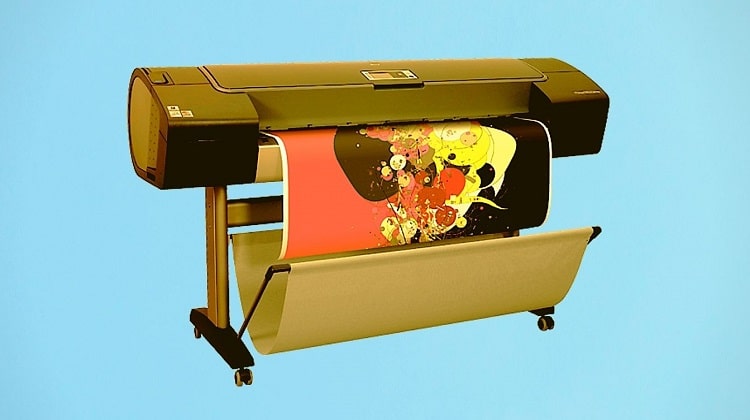
Whether you're an architect producing CAD floor plans, a sign shop running vinyl cuts, or a photographer printing panoramic gallery pieces, the mechanics of how a plotter printer works affect your output quality, your media costs, and your maintenance schedule in ways that matter every single day. Wide-format inkjet plotters can print at 60 inches wide and virtually unlimited length. Cutting plotters skip ink entirely and use precision drag blades to trace contours through adhesive vinyl. Hybrid print-and-cut units combine both in a single pass. Each type operates on the same core principle — synchronized dual-axis motion — but the specifics of that motion shape what each machine can and can't do.
This guide breaks down the hardware, the step-by-step process, the real-world applications, and the maintenance requirements, then gives you an honest look at the trade-offs before helping you decide whether a plotter is actually the right tool for your situation.
Contents
- Inside the Machine: Core Components of a Plotter Printer
- How a Plotter Printer Works: The Step-by-Step Process
- Where Plotter Printers Earn Their Keep
- Keeping Your Plotter Running Right
- The Honest Trade-Offs: Pros and Cons
- Building a Long-Term Plotter Strategy
- When a Plotter Makes Sense — And When It Doesn't
- Frequently Asked Questions
- Next Steps
Inside the Machine: Core Components of a Plotter Printer
Before you can fully understand how a plotter printer works, you need to know what's inside one. The hardware is more specialized than anything in a standard office printer, and each component has a direct impact on output precision.
The Carriage and Rail System
The carriage is the moving arm that carries the print head or cutting blade across the width of the media. It rides on a precision-machined aluminum rail and is driven by a stepper motor that advances in tiny, controlled increments. Entry-level plotters use stepper motors; professional-grade models use servo motors for finer positional control and higher travel speeds. The difference shows up clearly on long diagonal lines — cheaper motors introduce micro-stepping artifacts that appear as subtle stair-stepping on curves.
Print Heads and Ink Delivery
Most wide-format inkjet plotters use piezoelectric print heads rather than thermal heads. A piezoelectric crystal deforms when voltage is applied, ejecting a precise droplet of ink without generating heat. This matters because thermal heads reach temperatures that degrade certain specialty inks — particularly pigment-based inks used in archival and technical printing. For a detailed breakdown of how ink chemistry affects output longevity and color accuracy, our dye ink vs. pigment ink guide covers exactly what separates the two formulations and when each is the right choice.
Media Feed and Tension Systems
Plotters feed roll media through pinch rollers that grip the edges at multiple contact points. Consistent media tension across the full width is critical. Any slack or skew causes banding, misregistration, or blurred lines — especially on long prints where small errors accumulate over distance. Professional plotters include tension sensors that monitor and adjust roller pressure in real time as the roll diameter decreases and media weight shifts during a job.
Cutting Plotters: A Blade Instead of a Head
Cutting plotters replace the print head with a small drag blade mounted in a spring-loaded holder. The blade follows vector paths and cuts through adhesive vinyl, heat-transfer film, cardstock, and other thin substrates. Blade offset — the distance between the blade tip and the center of the holder — must be calibrated precisely for clean corners. Hybrid print-and-cut plotters carry both an inkjet head and a blade, printing a design and then optically registering and cutting its contour in a single workflow.
According to Wikipedia's overview of plotters, the technology dates back to 1953, when Remington-Rand developed the first plotter for use with the UNIVAC computer — originally using a drum mechanism with an ink pen rather than today's inkjet delivery systems.
How a Plotter Printer Works: The Step-by-Step Process
Pro tip: Always send true vector files to your plotter — embedding a rasterized image inside a PDF doesn't make it vector, and upscaled bitmaps at large format sizes will expose every pixel.
Vector Input and Driver Processing
Everything starts with a vector file — a DXF from AutoCAD, an SVG from Illustrator, a PDF with embedded vector paths, or an EPS from CorelDRAW. The plotter driver (or a dedicated RIP — Raster Image Processor) reads the coordinate data and translates it into motion commands: X-axis travel for the carriage, Y-axis advance for the media, and Z-axis lift commands for pen plotters or pressure settings for cutting plotters. The RIP also handles color separation for inkjet models, mapping file colors to the physical ink channels loaded in the machine.
Synchronized Dual-Axis Motion
Synchronized dual-axis movement is the core mechanic that defines how a plotter printer works. The carriage moves left and right while the media advances forward or backward — simultaneously, not sequentially. This allows the plotter to trace curves, diagonals, arcs, and complex geometric outlines in continuous motion without lifting the head. The controller board coordinates both axes using feedback from optical encoders — precision sensors that count motor steps and confirm real-world position against expected position, correcting drift before it accumulates.
Ink Deposition or Cutting Pass
For inkjet plotters, the print head fires droplets in swath passes — the head travels across the media width, advances the media a fixed amount, and repeats. Multi-pass printing (4-pass, 8-pass, 16-pass) overlaps swaths to blend banding artifacts and improve color uniformity, at the cost of speed. For cutting plotters, the blade stays in continuous contact with the media, using overcut settings at path endpoints to prevent uncut tags at corners.
| Plotter Type | Input Format | Output Method | Typical Max Width | Primary Use Case |
|---|---|---|---|---|
| Wide-Format Inkjet | Vector + Raster | Piezo inkjet heads | 60"–64" | Blueprints, banners, giclée prints |
| Pen Plotter (legacy) | Vector only | Pen on mechanical arm | 36" | Technical line drawings |
| Cutting Plotter | Vector only | Drag blade | 60" | Vinyl signs, decals, stencils |
| Print-and-Cut Hybrid | Vector + Raster | Inkjet head + blade | 54" | Stickers, heat transfer, apparel graphics |
| Electrostatic Plotter | Vector + Raster | Electrostatic charge + toner | 54" | High-speed technical document output |
Where Plotter Printers Earn Their Keep
Understanding how a plotter printer works only matters if you connect it to the jobs where that capability translates into real-world value. These are the industries where plotters are not optional equipment — they're the only practical solution.
Architecture and Engineering
CAD-produced technical drawings require absolute dimensional accuracy. A 1:50 scale floor plan must measure exactly right on paper — a 10-meter wall must be precisely 200mm, not 198mm. That tolerance requirement eliminates standard printers immediately. Architectural and engineering firms depend on plotters precisely because dimensional accuracy is a contractual and legal requirement, not a preference. A scaled drawing that's off by even 1% can cause measurement errors during construction that cost thousands to fix.
Maps and Geospatial Output
GIS-generated maps contain dense vector data — contour lines, road networks, property boundaries, elevation bands — that desktop printers render poorly at scales larger than 13x19 inches. If you regularly produce large-format map output, our best printer for maps guide walks through the exact specs — including minimum DPI, color accuracy requirements, and paper handling — that separate adequate from professional output at map scales.
Signage and Vehicle Wraps
Vinyl cutting plotters dominate the sign-making and vehicle wrap industry. A production cutting plotter operates at speeds up to 800mm/s, letting a single operator produce professional signage in minutes. Eco-solvent inkjet plotters handle outdoor banners, vehicle graphics, and window decals where UV resistance and weatherability are non-negotiable. Our eco-solvent printer guide breaks down which models handle these outdoor applications best, including ink durability data and media compatibility charts.
Fine Art and Photography
Wide-format inkjet plotters running 10- or 12-ink pigment sets produce museum-quality giclée prints at sizes that desktop machines physically can't match. The extended color gamut of a professional pigment plotter — particularly in shadow detail and saturated reds — exceeds what any standard photo printer delivers at large scale. For craft-focused applications that blur the line between printing and cutting, see our roundup of the best printers for Cricut Maker projects, which covers where desktop machines and cutting tools intersect.
Keeping Your Plotter Running Right
Warning: A plotter left idle for more than a week without a maintenance cycle will almost certainly need at least one cleaning cycle before it produces clean output — factor that ink cost into your usage planning.
Print Head Maintenance
Inkjet plotter heads clog faster than desktop printer heads because of the longer idle periods between production jobs. Run a nozzle check before every major job — not every print session, but every time you're about to run production output. If any nozzles show gaps or deflection in the test pattern, run one cleaning cycle and recheck before committing media. Don't run multiple cleaning cycles back to back — each one consumes 15–30ml of ink across channels. One targeted cycle followed by a recheck is the correct protocol.
Media Handling and Storage
Roll media exposed to humidity warps at the edges and causes feed problems that look like mechanical failures but are actually just media conditioning issues. Store rolls vertically on end caps, or horizontally in sealed bags with silica desiccant packets. Media left loaded on the plotter overnight in a humid environment can cause banding on the first few feet of the next morning's run. Always feed through a short test strip before running production work after any idle period longer than a few hours.
Blade and Cutter Maintenance
Cutting plotter blades dull after approximately 1,500–2,500 feet of cutting, depending on media density and blade angle. A dull blade drags instead of cutting cleanly, leaving torn edges, uncut corners, and ragged curves that require manual weeding. Maintain a rotation of at least two blades — one active, one spare — and replace proactively on a footage schedule rather than waiting for visible cut quality degradation. A fresh blade costs less than one ruined production run.
Calibration
Calibrate media feed every time you switch to a different roll type or roll weight. A 0.5% feed error over a 48-inch tall print creates nearly a quarter-inch of vertical distortion — invisible on casual inspection but immediately obvious when two panels are butted together for a mural or a tiled architectural drawing. Most modern plotters include a built-in calibration routine: print a test pattern, measure it with a ruler, enter the measured value, and the firmware calculates and applies the correction factor automatically.
The Honest Trade-Offs: Pros and Cons
Knowing how a plotter printer works doesn't automatically mean you need one. Here's the straight picture on what you're getting and what you're giving up.
| Pros | Cons |
|---|---|
| Dimensional accuracy to ±0.1mm at large format | High upfront hardware cost ($500–$15,000+) |
| Handles widths and lengths impossible for desktop printers | Requires true vector source files for technical work |
| Archival pigment ink options for museum-quality output | Print head maintenance is time-intensive and ink-costly |
| Cuts and prints in a single pass (hybrid models) | Large physical footprint — needs dedicated floor or bench space |
| Scales to virtually unlimited media length on roll stock | Per-print ink costs are significant at high quality settings |
| Handles specialty media (canvas, vinyl, backlit film) | Idle periods cause head clogging without maintenance cycles |
Building a Long-Term Plotter Strategy
Buying a plotter is a commitment. The hardware is only the starting point — your software workflow, consumable costs, and upgrade path all shape whether the investment pays off over time.
Software and File Ecosystem
Your output quality is only as good as your input files. Invest in software that generates true vector output — AutoCAD, Adobe Illustrator, CorelDRAW, QGIS for mapping, or Onyx RIP for production color management. A bitmap file upscaled to plotter dimensions produces blurry, pixelated output regardless of how capable the plotter is. The plotter can only reproduce what the file contains — it can't fabricate vector precision from raster data.
Ink and Consumable Costs
Wide-format inkjet plotters consume ink at a rate that surprises first-time buyers. A single 24"×36" print at high quality uses 15–25ml of ink across color channels. Calculate your cost-per-print before you buy: take the total ink capacity of a full set of cartridges, divide by your expected ml-per-print, and you have your yield. Then compare that to your current output method. For large-format desktop printing that stops short of needing a true plotter, our best 13x19 printer guide shows exactly where desktop machines max out on size and when a wide-format plotter becomes necessary.
Choosing the Right Model
For serious plotter shopping backed by hands-on testing data, our best plotter printer guide covers top models across wide-format inkjet, cutting, and hybrid categories — including real-world accuracy tests, ink cost analysis, and software compatibility notes that manufacturer spec sheets don't tell you.
When a Plotter Makes Sense — And When It Doesn't
This is the part most plotter guides skip. Knowing how a plotter printer works is useful — knowing whether you actually need one saves you serious money.
Use a Plotter When…
- You regularly print at 17 inches wide or larger, especially on roll media at variable lengths
- Your files are vector-based — CAD drawings, technical schematics, vector signage art
- Dimensional accuracy within fractions of a millimeter is a contractual or professional requirement
- You cut vinyl, heat-transfer film, or thin substrates at production volume
- You produce archival or gallery-quality prints at sizes above 13x19 inches
- You need to tile or butt-register multiple panels — a plotter's feed accuracy is the only way to get clean seam-to-seam alignment
Skip a Plotter When…
- Your largest output is 13x19 inches — a dedicated large-format photo printer handles this at a fraction of the cost and maintenance burden
- Your documents are standard office sizes — letter, legal, tabloid — where any modern printer handles the job
- You print infrequently — plotters left idle develop head clogs that cost ink and time to clear, making the effective cost-per-print much higher than the math suggests
- Your files are primarily photographic — raster-heavy photographic output at moderate sizes is better handled by a purpose-built photo printer
If photo printing is your primary focus rather than technical or large-format work, our best photo printer under $200 guide covers dedicated photo printers that deliver exceptional image quality at a fraction of the cost of any plotter.
Frequently Asked Questions
What is the main difference between a plotter and a regular printer?
A regular printer builds images from a fixed grid of dots (raster output), while a plotter moves its print head or cutting blade along vector coordinate paths. This makes plotters far more accurate for line-based technical work and capable of handling widths and media lengths that desktop printers cannot physically accommodate.
Can a plotter printer handle photographs?
Wide-format inkjet plotters can print photographs at extremely large sizes, and high-end models with 10–12 ink pigment sets produce exceptional photographic quality. However, for standard photo sizes up to 13x19 inches, a dedicated photo printer is more cost-effective and easier to maintain than a full-size wide-format plotter.
What file formats work best with plotter printers?
Vector formats are the native language of plotters: DXF (AutoCAD), SVG, EPS, AI (Illustrator), and PDF with embedded vector paths all work well. For inkjet plotters handling photographic or mixed content, high-resolution TIFF or PDF files processed through a RIP are the standard workflow. Avoid upscaled JPEGs or low-resolution bitmaps.
How much does it cost to run a plotter printer?
Costs vary significantly by model and usage pattern. Ink consumption runs approximately 15–25ml per square foot at production quality settings on inkjet plotters. Wide-format ink sets typically cost $50–$150 per channel, and a full replacement set for a 6–8 color machine runs $400–$900. Add media costs, blade replacements for cutting plotters, and periodic head maintenance supplies.
How long do plotter print heads last?
Inkjet plotter heads last anywhere from 50 to 500 liters of ink output depending on the manufacturer and head type. Epson and Canon use replaceable heads that users can swap themselves. HP and some professional brands use semi-permanent heads that last the life of the machine with proper maintenance. Always follow the manufacturer's cleaning cycle recommendations.
What is a cutting plotter and how does it differ from an inkjet plotter?
A cutting plotter uses a small drag blade instead of an ink-delivery print head. It follows vector paths to cut through adhesive vinyl, heat-transfer film, and thin substrates. It produces no ink output — it only cuts. Hybrid print-and-cut machines combine both systems, printing a design and then optically aligning and cutting its outline in a single workflow.
Do plotter printers require special software?
Yes. Plotters require software capable of producing true vector output — AutoCAD, Adobe Illustrator, CorelDRAW, or equivalent. For production color printing, a RIP (Raster Image Processor) like Onyx, Caldera, or EFI Fiery handles color profiling, ink limiting, and tiling. The plotter's bundled driver handles basic output, but production shops almost always run a dedicated RIP for consistent, professional results.
How do I prevent print head clogging on a plotter?
Run a nozzle check before every production job and a maintenance cycle if you detect any gaps. For plotters sitting idle more than three days, run a manual cleaning cycle before use. Keep the plotter powered on if possible — most plotters perform automatic maintenance cycles on a timer to keep heads primed. Store unused ink cartridges sealed and upright at room temperature.
Next Steps
- Audit your current largest print size and frequency — if you regularly need output wider than 17 inches more than twice a month, price out a wide-format inkjet plotter against your current outsourcing costs to see whether ownership pays off within 12 months.
- Evaluate your file workflow — open your most recent project files and confirm they're true vector format (DXF, SVG, AI, or vector PDF). If they're not, address your file creation pipeline before buying a plotter, since the hardware can only deliver what the files contain.
- Read our best plotter printer guide and shortlist two or three models that match your width requirements and ink type — then request media test prints from dealers before committing to a purchase.
- Set up a maintenance schedule before your first job — document your nozzle check routine, your idle-period cleaning protocol, and your blade replacement mileage threshold so maintenance doesn't become reactive and costly.
- Calculate your true cost-per-print using your shortlisted model's ink cartridge capacity and your expected ml-per-square-foot at your standard quality setting — factor this into your project pricing or budget before the machine arrives.



About Chris & Marry
Chris and Mary are a couple with a shared background in graphic design and print production who have spent years working with printers across creative and professional contexts — from art printing and photo output to label production and professional document work. Their combined experience evaluating printer performance, color accuracy, and paper handling across inkjet and laser platforms gives them a practical, hands-on perspective on what makes a printer worth buying. At ShopChrisAndMary, they cover printer reviews, buying guides, and recommendations for artists, photographers, and professional users.
Time to get FREE Gifts. Or latest Free printers here.
Disable Ad block to reveal all the info. Once done, hit a button below