The answer to how to iron Perler beads is precise and repeatable: place ironing paper over your completed design, set a household iron to medium heat with steam disabled, and move it in slow circular motions for 10 to 20 seconds until the beads fuse into a single rigid piece. This step defines the entire outcome of your project, and executing it correctly requires both the right technique and the right tools. For a broader look at craft tools that complement bead art projects, visit our art and craft printer resource hub.
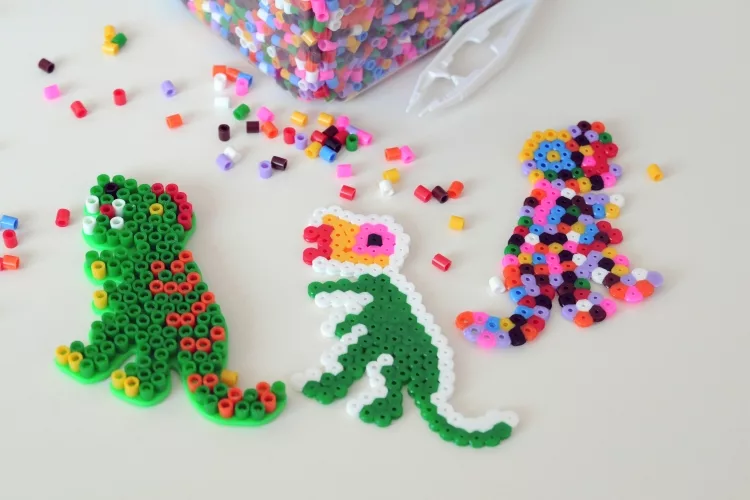
Perler beads — also called fuse beads — are small, hollow plastic cylinders arranged on a pegboard and then melted together using heat. The finished piece is a rigid, colorful mosaic suitable for display, gifting, or wearable accessories. While the concept is accessible to all ages, the ironing stage introduces variables that can make or break your finished work: heat intensity, duration, pressure, and ironing paper type all influence the final result.
This guide covers every stage of the ironing process with the precision needed to produce consistent, professional results — from preparing your design through the critical second-side iron that separates amateur work from display-quality pieces.
Contents
The Ironing Process: Step-by-Step Instructions
Understanding how to iron Perler beads from start to finish — before you pick up the iron — prevents the most common errors. Each stage builds directly on the previous one, and skipping any step increases the risk of a ruined design.
Preparing Your Design
Before applying any heat, confirm that every peg on your board is occupied as intended and that no bead has shifted out of position. A single displaced bead will be permanently fused in the wrong location once heat is applied. Once your layout is verified, follow this sequence:
- Place your pegboard on a flat, heat-resistant surface — a wooden table or tile countertop both work well.
- Lay the ironing paper flat over the entire design, covering all beads including those at the outer edges.
- Smooth out any wrinkles in the ironing paper before applying the iron — creases cause uneven heat distribution.
- For large designs, use tape along one edge of the ironing paper to prevent it from sliding during the ironing pass.
Preparation discipline pays dividends here. The same principles discussed in our guide on common mistakes using heat press transfer paper apply directly — misaligned materials and contaminated surfaces are equally damaging when working with fuse beads.
Applying Heat Correctly
Set your iron to a medium heat setting — approximately 250°F to 300°F (120°C to 150°C). Disable the steam function entirely and drain the reservoir to prevent accidental steam release. Begin moving the iron the moment it contacts the ironing paper; never hold it stationary over the beads.
- Apply light, consistent downward pressure while moving in slow, overlapping circular motions.
- Complete the first pass across the full design before lifting the iron to check progress.
- Gently lift one corner of the ironing paper to assess whether beads have bonded.
- If fusion is incomplete, replace the paper and apply an additional 5-second pass.
Pro tip: Preheat your iron for at least two full minutes before touching it to the ironing paper — an iron still climbing to temperature will deliver inconsistent heat in the critical first pass.
When to Iron and When to Hold Back
Timing is one of the most underestimated variables in bead fusion. Knowing precisely when to apply heat — and when to stop — is the defining skill that separates a clean, polished piece from one that is warped, under-fused, or irreversibly over-melted.
Signs Your Beads Are Ready to Iron
Your design is ready for ironing when all of the following conditions are met:
- Every bead is correctly positioned and stable — no shifting when the pegboard is gently tilted.
- The pegboard is resting on a firm, level surface with no flex.
- The ironing paper is smooth, wrinkle-free, and covers the full design area.
- Your iron has reached its target temperature and stabilized.
For complex, large-format designs, photograph the completed arrangement before ironing. This provides a reference if any beads shift during heat application and allows you to verify the design is intact before committing to fusion.
When to Stop Ironing
Over-ironing is permanent. When beads melt beyond their optimal fusion point, they flatten into a thin, glossy sheet — the characteristic holes shrink or close entirely, and the texture cannot be corrected. Stop ironing when the following indicators are present:
- Bead tops are slightly flattened and visibly bonded to adjacent beads.
- The ironing paper lifts cleanly without pulling beads with it.
- The design holds its form when you gently flex it at one edge.
| Fusion Stage | Visual Indicator | Recommended Action |
|---|---|---|
| Under-fused | Beads unchanged; cylindrical profile fully intact | Apply additional 5-second passes until bonded |
| Optimal fusion | Tops slightly flattened; beads bonded; holes still open | Stop immediately; allow full cooling before handling |
| Over-fused | Beads fully flat; holes closed; uniform glossy surface | Discard and restart — damage is irreversible |
Heat press operators will recognize this dynamic from temperature control fundamentals. The discipline outlined in the beginner's guide to heat press temperature and time settings transfers directly — precise temperature and timing prevent permanent material damage in both contexts.
Best Practices for a Flawless Fuse
Experienced crafters who produce display-quality work follow a consistent set of habits. Adopting these best practices from your first project eliminates the most common failure points before they occur.
Achieving Even Fusion Across Large Designs
Large designs — those covering a 29×29 peg board or larger — present an uneven heat challenge because a household iron's soleplate covers only a fraction of the total surface at once. Manage this systematically:
- Divide the design into quadrants mentally and iron each section with full, deliberate coverage before moving on.
- Overlap each pass by approximately one inch to eliminate cold spots between sections.
- Check fusion progress by lifting the ironing paper at a corner after each complete pass.
- Re-cover any under-fused section and apply an additional focused pass before proceeding.
Crafters who work with a variety of specialty papers will find relevant context in our overview of scrapbook paper types, weights, and tips — the relationship between paper weight and heat transfer applies directly to ironing paper selection for bead projects.
Two-Sided Ironing for a Professional Finish
Two-sided ironing produces a more durable piece with a smoother, consistent texture on both faces. It is the standard approach for any work intended for display, sale, or heavy handling. After completing the first-side iron, allow the design to cool on a flat surface for 60 seconds, then:
- Carefully flip the design onto a fresh sheet of ironing paper.
- Place another sheet of ironing paper over the now-exposed back side.
- Apply the same medium-heat circular motion for 10 to 15 seconds.
- Allow the design to cool completely — at least two minutes — before removing any paper.
Important: Never peel the ironing paper from a warm design — the beads remain soft and pliable until fully cooled, and premature removal deforms the surface permanently.
The second-side iron closes the hollow bead centers on the reverse face and significantly increases structural rigidity. Pieces finished with two-sided ironing resist flex cracking and surface delamination far better than single-side fused work.
Tools, Materials, and Heat Settings
Your results are directly tied to the quality and suitability of your equipment. Selecting the right iron and the correct ironing paper eliminates a broad category of preventable errors and produces repeatable, professional-grade results across every project.
Choosing the Right Iron
Not all household irons perform equally when fusing Perler beads. Prioritize the following specifications:
- Temperature precision: An iron with a clearly marked dial and stable heat output outperforms basic travel irons with vague temperature bands.
- Soleplate material: Ceramic and stainless steel soleplates distribute heat more evenly than aluminum. Avoid non-stick coated soleplates — they can transfer residue to the ironing paper under sustained heat.
- Steam function: Must be fully disabled. Drain the water reservoir completely before starting any bead project.
- Weight: A heavier iron applies consistent downward pressure without requiring excessive manual force, reducing the risk of uneven contact.
Ironing Paper Alternatives
The ironing paper packaged with Perler bead kits is calibrated for the exact melting characteristics of Perler brand plastics and remains the safest choice. When it is unavailable, these alternatives perform reliably:
- Unbleached parchment paper: The best widely available substitute. Bleached variants can transfer a faint tint to light-colored beads under extended heat.
- Wax paper: Acceptable for a single short pass on one side only — extended heat exposure melts the wax coating and bonds it to the beads.
- Glossy photo paper (face down): Produces a slightly smoother finished surface and releases cleanly, though it is strictly single-use.
For crafters interested in how paper properties interact with heat and adhesion, our review of the best sticker papers covers related material dynamics that experienced bead artists will find directly applicable.
Frequently Asked Questions
What heat setting should I use to iron Perler beads?
Set your iron to a medium heat setting — approximately 250°F to 300°F (120°C to 150°C) — with the steam function fully disabled. Higher temperatures cause irreversible over-melting, while lower temperatures produce incomplete fusion that leaves the design fragile and prone to falling apart when lifted from the pegboard.
How long does it take to iron Perler beads?
Most standard designs require 10 to 20 seconds of active ironing per side. Larger or denser designs may require multiple passes totaling 30 to 40 seconds. Check fusion progress between passes rather than applying continuous heat for an extended period — over-fusing accumulates quickly and is not reversible.
Can I use parchment paper instead of Perler ironing paper?
Yes. Unbleached parchment paper is a dependable substitute for the ironing paper included in Perler bead kits. It tolerates heat well, releases cleanly after cooling, and is widely available at kitchen supply and grocery stores. Avoid wax paper for anything beyond a single brief pass, as sustained heat causes the wax coating to melt and adhere to the bead surface.
Key Takeaways
- Set your iron to medium heat (250°F–300°F) with steam fully disabled, and move it in slow circular motions for 10 to 20 seconds to fuse Perler beads correctly.
- Stop ironing the moment bead tops are slightly flattened and bonded — over-fusing is permanent and the only correction is restarting from scratch.
- Always iron both sides of your design for greater structural rigidity and a consistent, professional surface finish on both faces.
- Unbleached parchment paper is the most reliable substitute when Perler ironing paper is unavailable; avoid wax paper for any sustained heat application.



About Chris & Marry
Chris and Mary are a couple with a shared background in graphic design and print production who have spent years working with printers across creative and professional contexts — from art printing and photo output to label production and professional document work. Their combined experience evaluating printer performance, color accuracy, and paper handling across inkjet and laser platforms gives them a practical, hands-on perspective on what makes a printer worth buying. At ShopChrisAndMary, they cover printer reviews, buying guides, and recommendations for artists, photographers, and professional users.
Time to get FREE Gifts. Or latest Free printers here.
Disable Ad block to reveal all the info. Once done, hit a button below