You can print on paper napkins using a standard inkjet printer — and it works better than most people expect. The essential trick is taping the napkin flat to a regular sheet of printer paper so it feeds through without jamming or tearing. Once you know that, learning how to print on paper napkins becomes a quick project you can repeat for any occasion.
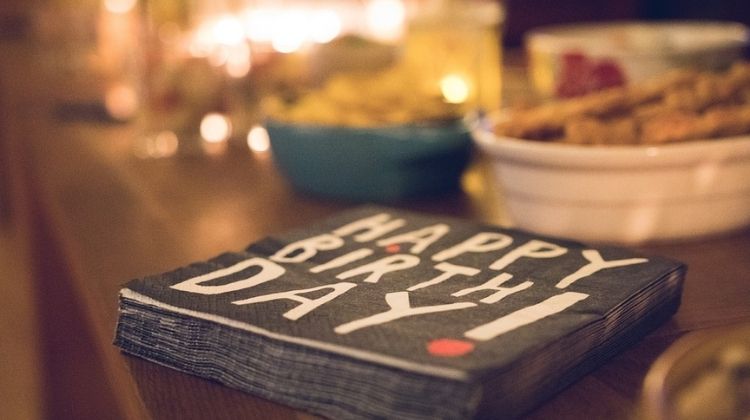
Napkins are thin, soft, and absorbent — quite different from printing on glossy paper, which has a firm coated surface that glides through most printers easily. Without proper support, a loose napkin will fold, catch on the feed rollers, and either jam or come out mangled. A simple backing sheet fixes all of that.
Whether you're personalizing napkins for a wedding, birthday party, or a craft project, this guide walks you through the whole process — from choosing the right napkin to dialing in your print settings for clean, vibrant results every time.
Contents
How to Print on Paper Napkins the Right Way
Getting a clean print on a napkin isn't complicated, but it does require following a few specific steps in order. Skip one and you'll likely end up with a smeared design, a crumpled napkin, or a printer jam. Do them all and you'll get consistent results from the very first sheet.
Choosing the Right Napkins
Not all napkins are equal when it comes to printing. Here's what works and what doesn't:
- 2-ply napkins are the sweet spot. They're firm enough to hold their shape through the printer but thin enough not to jam.
- Single-ply napkins are very fragile — they tear easily inside the machine. Avoid them.
- 3-ply napkins are too thick and won't feed through most home inkjet printers without getting stuck.
- Choose white or very light-colored napkins. Dark backgrounds will swallow your design and waste ink.
- Skip napkins with embossed patterns or raised textures — the uneven surface makes it nearly impossible to get a clean print.
Plain white cocktail napkins (the square ones, roughly 6" x 6" when unfolded) are the most commonly used option. You'll find them at craft stores, party supply shops, and big-box retailers for very little cost.
Preparing Your Napkin for Printing
This is the single most important step. Without a backing sheet, your napkin will crumple or jam inside the printer. Here's the process step by step:
- Unfold the napkin completely so it lies as a single flat layer — don't leave it folded into quarters.
- Place a standard 8.5" x 11" sheet of printer paper flat on your work surface.
- Center the napkin on top of the paper and lay it flat.
- Use painter's tape or regular tape along all four edges to secure the napkin to the paper. Press each strip of tape down firmly.
- Smooth the napkin with your hand to eliminate any air bubbles or wrinkles before taping the last edge.
- Load the prepared sheet into your printer with the backing-paper side down and the napkin facing up toward the print head.
Take your time with the taping. Any loose edge will catch on the printer's feed rollers, and re-threading a torn napkin out of a printer is messy and time-consuming.
Printer Settings That Matter
Your print settings affect both color vibrancy and how well the ink bonds to the absorbent napkin surface. Use these as your baseline:
- Set the paper type to "photo paper" or the highest quality option your printer offers. This tells the printer to lay down more ink, which compensates for the napkin's absorbency.
- Choose "best" or "high" print quality — not draft or normal.
- Use single-sheet or manual feed if your printer supports it. It's gentler on delicate materials than the auto-feed tray.
- Print in color mode even for black-only designs. Using color mode often produces sharper contrast than the dedicated black ink cartridge alone.
Pro tip: Let the printed napkin sit flat for at least 10–15 minutes before touching it. Inkjet ink takes longer to set on soft, porous surfaces, and handling it too soon will smear your design.
What You Can Make with Printed Napkins
Once you've got the technique down, printed napkins are more versatile than they first appear. Most people use them for one of two main purposes: personalizing events or completing craft projects.
Events and Celebrations
Custom napkins are one of the easiest and most affordable ways to personalize any gathering. A few of the most popular uses:
- Weddings: Print the couple's names and date for a simple, memorable keepsake napkin at the reception table.
- Birthday parties: Add a child's name and age, a favorite character, or a matching theme design.
- Baby showers: Announce the baby's name or gender with a coordinated design that matches the rest of your décor.
- Holiday gatherings: Create seasonal designs for Thanksgiving, Christmas, or New Year's celebrations.
- Corporate events: Print a company logo or event name for branded table settings at a low per-unit cost.
For events, always print a test batch a day or two early so you have time to fix any design issues. Free tools like Canva make it simple to build a template at the right napkin size. If you enjoy designing custom paper crafts, our guide on how to print digital scrapbook paper covers similar design and scaling techniques that transfer well to napkin projects.
Craft and Decoupage Projects
Printed napkins have a dedicated following in the craft world, particularly for decoupage — a technique where paper layers are glued onto a surface and sealed with varnish. The thin, fibrous texture of napkins makes them ideal for this because they conform to curved surfaces better than regular paper does. Common applications include:
- Wood frames, boxes, and small furniture pieces
- Glass jars, vases, and candles
- Canvas bags and tote bags
- Ceramic flower pots and tiles
For a related approach to transferring designs onto surfaces, see our guide on how to print on iron-on transfer paper. If you do a lot of specialty media printing, it's also worth exploring the best rice paper printers — rice paper has similar handling requirements to napkins and is popular for both crafts and edible printing.
Inkjet vs. Laser: A Side-by-Side Look
The short answer: use an inkjet printer. Always. But it helps to understand why, especially if you only have a laser printer at home and are wondering whether you can make it work.
Laser printers use a heated fuser unit to bond toner powder onto paper. That heat is the problem. Napkins are made of thin tissue fibers that can scorch, warp, or melt under a laser printer's fuser — and the toner itself doesn't bond well to soft, porous surfaces anyway. Inkjet printers spray liquid ink without applying any heat, which is why they're the only practical option for napkin printing at home.
According to Wikipedia's overview of inkjet printing, inkjet technology works by propelling precise droplets of ink directly onto the substrate — a process well-suited to soft, porous materials like napkins.
| Feature | Inkjet Printer | Laser Printer |
|---|---|---|
| Heat during printing | None | High (fuser unit) |
| Safe for paper napkins | Yes | Not recommended |
| Color vibrancy on absorbent surfaces | Good to excellent | Poor — toner doesn't bond |
| Risk of scorching or damage | None | High |
| Drying time after print | 10–20 minutes | N/A (not suitable) |
| Cost per print | Low to medium | Not applicable here |
If you're looking for a printer that handles delicate and specialty media well, our photo printer reviews cover models with reliable feed systems and high ink-deposit settings that work well for projects like this.
The Honest Truth: Benefits and Drawbacks
Printing on napkins is genuinely useful for a wide range of people. But it does come with real limitations. Here's a balanced look at both sides so you can decide if it's the right approach for your situation.
Why It's Worth Trying
- Very low cost: Plain white napkins are inexpensive, and you only need standard inkjet ink.
- No special equipment required: Any inkjet printer works. No specialty machine needed.
- Fully customizable: You control every aspect of the design — colors, fonts, images, layout.
- Small batches are practical: Unlike commercial print services, you can print 5 napkins or 50 with no minimum order.
- Fast turnaround: Once your design is ready, you can have finished napkins in under an hour.
Where Things Can Go Wrong
- Inkjet ink is not waterproof. If a napkin gets wet — at a party, for example — the design will smear or run.
- Colors may appear duller on a napkin than on your screen. Napkins absorb ink differently than coated paper, so what looks bright on screen can look slightly muted in print.
- Thin napkins can jam or tear, especially on older printers with aggressive feed rollers.
- You cannot iron the printed side. Heat ruins inkjet ink.
- For very large batches, the time cost per napkin adds up quickly. Commercial printing becomes more practical at scale.
For most home and small-event use cases, the benefits outweigh the drawbacks. If you need hundreds of precisely color-matched napkins, ordering from a commercial printer is likely the smarter call.
Mistakes That Wreck Your Napkin Prints
Most failed prints come down to the same few avoidable errors. Knowing what they are ahead of time saves you wasted napkins and frustration.
Skipping the Backing Sheet
This is by far the most common mistake. Feeding a loose napkin directly into a printer almost always ends in a jam. The napkin folds, catches on the rollers, and gets pulled unevenly — or it tears apart inside the machine, which is a real hassle to clean up.
Always tape the napkin flat to a backing sheet of regular printer paper first. There are no situations where skipping this step is a good idea, even with thicker 2-ply napkins.
Wrong Settings, Wrong Results
The second most common problem is using print settings designed for plain paper rather than porous or specialty media. Common culprits:
- Draft mode deposits minimal ink and produces washed-out, faded prints on any absorbent surface. Always use high or best quality.
- Leaving the paper type set to "plain paper" tells the printer to conserve ink — switch it to "photo paper" or "glossy" for better saturation.
- Printing too fast. Slower printing gives the ink more time to settle evenly on the napkin surface instead of pooling or bleeding.
If you've ever struggled with ink adhesion on other specialty materials, the same principle applies here. Our guide on how to print on clear sticker paper goes into similar detail about adjusting settings for non-standard print surfaces.
Simple Tricks That Improve Your Results Right Away
You don't need a printer upgrade or expensive supplies to get noticeably better napkin prints. These small adjustments are quick to implement and make a real difference.
Always Do a Test Print on Regular Paper First
Before using a single napkin, print your design on a plain sheet of paper. This one step lets you:
- Verify the sizing is correct. Most cocktail napkins are about 6" x 6" when fully unfolded — scale your design to match before printing.
- Check that colors look the way you want before committing to your napkins.
- Catch typos, alignment issues, or design problems at zero cost.
Two minutes on a test print can save you an entire stack of napkins. It's the same reason experienced printers always run a quick check before any specialty job.
Settings Worth Adjusting Before You Print
A few extra tweaks beyond the basics can push your results from decent to great:
- Boost saturation or vibrancy in your design software before exporting. Napkins absorb ink and can make colors look slightly duller than they appear on screen — compensating in the design file helps.
- Favor bold, graphic designs over fine photographic detail. Simple logos, text, and solid shapes hold up much better on napkin surfaces than intricate photos.
- Turn off "borderless printing" if your printer has it. Borderless mode pushes ink all the way to the edges, which increases the risk of jamming with backed napkins.
- Lay printed napkins flat to dry for at least 30 minutes before stacking them. Stacking too soon transfers wet ink from one napkin to the surface of the next.
Next Steps
- Pick up your supplies: Grab a pack of plain white 2-ply cocktail napkins and confirm your inkjet printer has enough ink for a test run. Both should be easy to source locally or online.
- Create your design: Use a free design tool like Canva and set the canvas to your napkin's unfolded dimensions (typically 6" x 6"). Keep it bold and simple for the best printed result.
- Run a test print on plain paper: Print the design on a regular sheet first. Check the sizing, colors, and layout before you touch a napkin.
- Prepare your first napkin: Tape one napkin flat to a backing sheet of printer paper, smooth out any wrinkles, then run your first real print using the high-quality and photo-paper settings outlined above.
- Explore what's next: Once napkin printing feels comfortable, try branching out to other specialty media — our guides on printing on clear sticker paper and printing on glossy paper cover similar techniques for different surfaces and projects.



About Chris & Marry
Chris and Mary are a couple with a shared background in graphic design and print production who have spent years working with printers across creative and professional contexts — from art printing and photo output to label production and professional document work. Their combined experience evaluating printer performance, color accuracy, and paper handling across inkjet and laser platforms gives them a practical, hands-on perspective on what makes a printer worth buying. At ShopChrisAndMary, they cover printer reviews, buying guides, and recommendations for artists, photographers, and professional users.
Time to get FREE Gifts. Or latest Free printers here.
Disable Ad block to reveal all the info. Once done, hit a button below